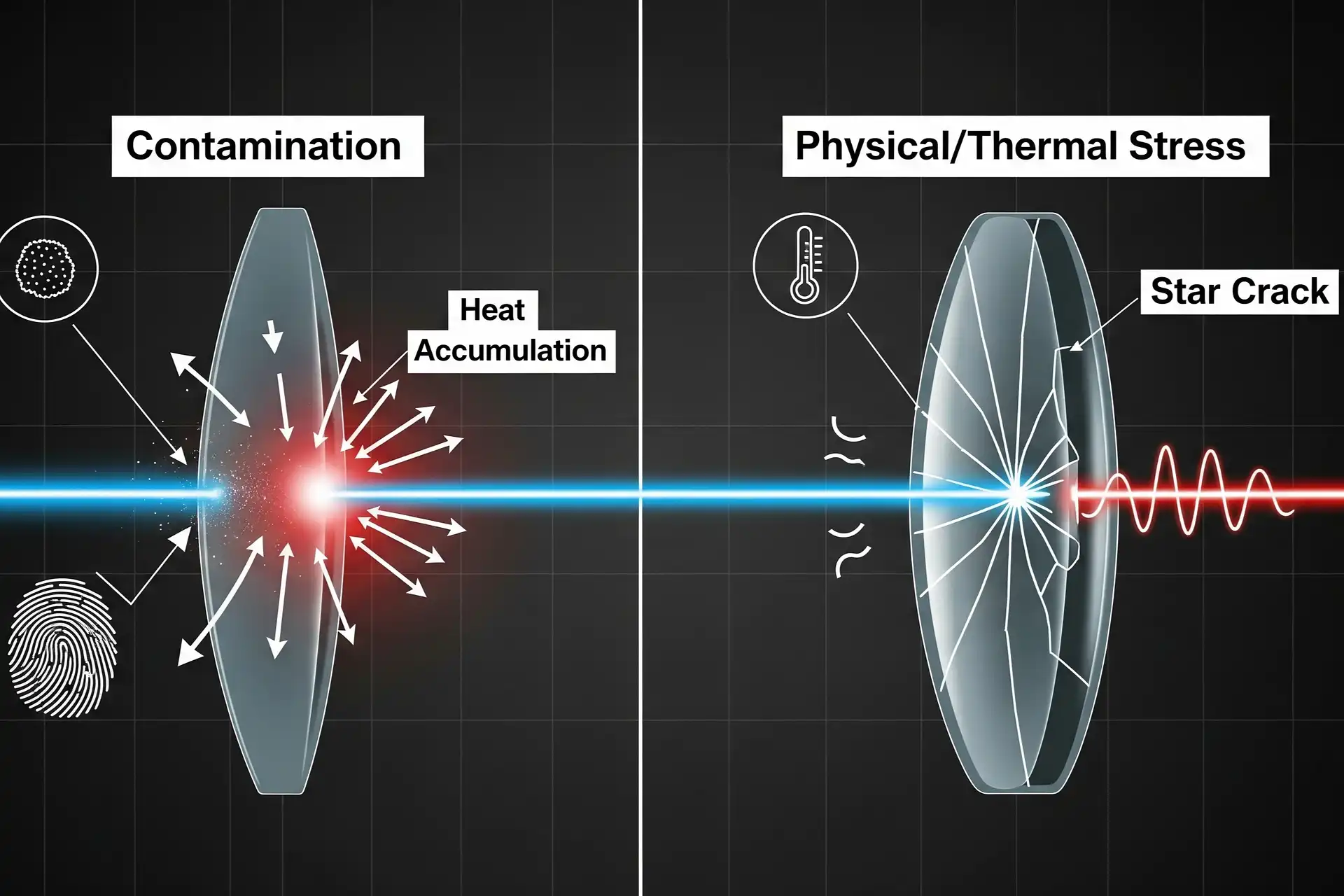
You must ensure the cleaning of laser lenses is done regularly because dust and oil can accumulate quickly. These contaminants can obstruct or diffuse the laser beam. If you neglect the cleaning of laser lenses, their performance may decline significantly, and they could even sustain permanent damage. Accumulated dirt can shorten the lifespan of your equipment. Additionally, if you do not handle the lenses with care or clean them improperly, you risk scratching them or damaging the coating.
Key Takeaways
- Clean laser lenses after 100 hours to keep them working well and stop damage.
- Use wipes that do not leave lint and clean gently so you do not scratch the lens or ruin its coating.
- Check lenses often for dirt or damage to make sure the laser works its best.
- Keep the area clean to lower dust and other things that can hurt the lenses.
- Always wear gloves and be careful when touching lenses so you do not leave fingerprints or break them.
Importance of Clean Laser Lenses
Performance Impact
You need your laser system to work well. If the lens is dirty, the laser may lose power and accuracy. Dust and other things can block or scatter the laser beam. This can make the laser act differently. You might see cuts that are not even, blurry marks, or weak cleaning. If you do not clean the laser lenses, the system will not work as well as it should.
Clean the laser lenses every 100 hours to keep your equipment working well. Clean lenses let the laser beam go through without losing energy. This gives you sharper and better results. You also stop problems with the beam’s path and shape, which can change your work quality.
Keeping the lens clean is important for good work. When there is no dust or dirt, the laser energy moves easily. This helps the laser beam stay strong and focused. You can trust your laser to work well if you clean the lenses often.
Lens Longevity
If you want your laser lenses to last, you must take care of them. Dirt and stains can hurt the lens over time. Scratches and coating loss can happen if you use the wrong cleaning tools or ways. You should look at the lens every day for damage.
- Look at the lens before and after each use for scratches, stains, or coating problems.
- Use lint-free wipes and anhydrous ethanol to clean gently in one direction.
- Do not use rough materials or wipe in circles to stop small scratches.
If you do these things, you keep your lenses safe and avoid buying new ones. Cleaning the laser lenses helps your system work well and last longer. You save time and money by stopping damage and keeping high performance.
Cleaning of Laser Lenses: Main Reasons
Dust and Particulates
Laser lenses often get dust and tiny bits on them. This happens a lot in factories. The dust comes from things you cut, like metal, plastic, or wood. Cutting stainless steel or aluminum makes small metal pieces land on the lens. Plastics and wood give off dust and harmful gases. These things can block or spread out the laser beam. This makes cuts less exact and lowers power.
Light can pull dust from the air into the laser beam. Over time, this makes the laser work worse.
| Material Cut | Dust Composition | Potential Hazards |
|---|---|---|
| Stainless Steel | Fine metal particles | Breathing problems, skin itching |
| Aluminum | Metal bits, oxides | Metal fume sickness |
| Plastics | Harmful gases, carbon | Breathing trouble |
| Wood | Dust from wood, resins | Skin itching |
| Titanium | Metal dust, oxides | Fire risk |
To keep your laser working well, keep dust away. Clean the laser lenses often to stop beam and alignment problems.
Oil and Fingerprints
You might touch the lens by mistake or not wear gloves. Oil and fingerprints can build up fast. These marks soak up light and spread it out. This makes the laser less clear and less strong. Fingerprints can also make glare and lower contrast.
- Oil and fingerprints soak up light and lower power.
- Fingerprints add water, causing glare and blurry spots.
- Cleaning laser lenses takes away these problems and keeps things sharp.
Always wear gloves and clean the lens the right way to stop these issues.
Environmental Contaminants
Some places have air with tiny bits, chemicals, and dangerous leftovers. These things land on the lens and make it easier to damage. Carbon bits can make the laser beam weak and not focused.
Dirty air can make the lens break easier, which is bad for keeping the laser beam strong and clear.
| Contaminant Type | Description |
|---|---|
| Ultrafine Particles | Metal oxides, carbon soot, smog in the air |
| Volatile Organic Compounds | Come from plastics and wood, make ozone |
| Specific Materials | Leftovers from cutting, can break the lens |
Clean the laser lenses often to keep the beam strong and focused.
Operational Residue
When you use the laser, dirt and leftovers can build up on the lens. This can be spots from dirty parts or color changes from oil. If the laser heats these things, the lens coating can break fast. You might see rainbow colors or spots, which means damage.
Cleaning laser lenses gets rid of this dirt and saves the coating. This helps your equipment last longer.
Causes of Laser Lens Damage

Improper Cleaning Methods
You can hurt your laser lens if you clean it the wrong way. If you rub too hard, you might scratch the lens. Cleaning in circles can also make scratches. If you do not blow off dust first, dirt can get pushed into the lens. This leaves tiny scratches that get worse over time. You might see star-shaped cracks or lose the coating if you press too much. Always clean gently and move in straight lines. Do not press down on the lens.
Tip: Blow away loose dust before wiping the lens.
Wrong Cleaning Materials
Using the wrong cleaning stuff can harm laser lenses. Some things leave fibers or chemicals that react with the coating. Others can scratch the lens. Here are some problems:
- Contaminants can burn at high laser heat, causing corrosion and making the lens work worse forever.
- Dirt can make heat spread unevenly, which can bend or crack the lens over time.
- Dirty focusing lenses can make strong lasers hit one spot, causing damage that cannot be fixed.
Always use lint-free wipes and cleaning solutions made for lenses. Never use paper towels, rough cloths, or home cleaners.
Thermal Stress
Laser lenses get very hot when used. If they heat up or cool down too fast, they can crack. Quick temperature changes make the glass or coating stretch or shrink unevenly. This can cause star-shaped cracks or break the lens. You might see rainbow colors or spots, which means the coating is hurt. Let the lens reach room temperature before cleaning or using it.
Mechanical Stress
Mechanical stress happens if you drop, bump, or press on the lens. Even small hits can make cracks or chips. Sometimes, stress waves move through the lens and make different cracks. The table below shows how stress can hurt your lens:
| Evidence Description | Key Findings |
|---|---|
| Dynamics of stress waves | Stress waves change how cracks grow in fused silica under laser light. |
| Rayleigh waves impact | Rayleigh waves near the surface can cause damage along the lens. |
| Crack formation | R- and S-waves can make round and long cracks. |
| Laser damage dynamics model | Many stress waves from side cracks can spread damage under laser light. |
| Interaction of stress/damage | Stress has a big effect on damage growth in optics like fused silica. |
Always handle lenses carefully. Use both hands and do not touch the surface.
Coating Damage
The coating protects your laser lens and helps the beam go through. If the coating gets hurt, the lens will not work well. You may see different kinds of coating damage:
- Coating ablation: Heat from the laser can make blisters on the coating.
- Spot damage: Happens in dielectric materials with particles that soak up light.
- Fractures and cracks: Local heat changes can stretch and stress the lens, causing cracks.
If you see spots, blisters, or cracks, replace the lens. Damaged coatings can make the laser scatter or lose power.
Environmental Effects
The area around your laser can also hurt the lens. High humidity can make water form on the lens. This makes the lens and other parts get old faster. Water drops can lower the laser’s power and quality. Sometimes, condensation can even cause short circuits in the laser’s electronics.
- High humidity can make water form on laser parts, making them age faster.
- Condensation can cause short circuits in the laser’s wires.
- Water drops can make the laser work worse and change the spot shape.
Keep your laser in a dry, clean room to stop these problems.
Contaminant-Induced Heating
When dust, oil, or other dirt stays on the lens, the laser heats it up. This can burn or turn the dirt into carbon. The heat can hurt the coating or crack the lens. Sometimes, the laser beam hits a dirty spot and makes it very hot. This can cause star-shaped cracks or coating loss. Clean the lens often and keep your work area clean to stop this.
Note: Clean and handle lenses carefully to avoid most damage.
Best Practices for Lens Care
Safe Cleaning Procedures
You should use safe ways to clean laser lenses. First, blow off dust with a blower or air. Always wear gloves to stop oil and fingerprints. Use pure acetone or isopropanol on a damp cloth. Clean gently in circles from the center out. Do not use too much solvent because it can leave marks. Take out the lens, rinse it, and wait one minute before wiping. Do not clean metal coatings because they are soft and easy to harm.
- Good cleaning habits keep lenses from getting scratched.
- Gentle cleaning helps protect special coatings.
- Using the right ways stops eye irritation and keeps you safe.
- High-quality lenses cost a lot, so safe cleaning saves money.
Proper Handling
Handle laser lenses with care every time. Always wear gloves and use both hands to avoid dropping or bumping the lens. Use approved cleaning materials to stop scratches and chemical damage. Regular checks and cleaning help you find dirt before it causes trouble. Keeping your workspace clean lowers dust and particles that can change the laser beam or make it too hot.
Tip: Never touch the lens surface with bare hands.
Environmental Controls
You need to control the environment to keep your lenses clean. The Omega Laser Facility uses strict air rules to protect many lenses and mirrors. Air filters, controlled entry, and regular cleaning keep the room very clean. Watching for airborne contamination is important because high levels can hurt optical parts and lower how well they work. Use new technology and follow strict rules to keep your workspace clean.
Regular Inspection
Check your laser lenses often to find problems early. Cleaning laser lenses after each use keeps them working well. Look at the focus lens and mirrors every week, especially in dusty places. Check the laser power and clean or change air filters every month. Use the table below to help with your maintenance schedule:
| Maintenance Task | Frequency |
|---|---|
| Clean focus lens | After each use |
| Clean mirrors | Weekly or more often in dusty environments |
| Inspect and clean focus lens | Weekly |
| Calibrate laser power output | Monthly |
| Clean or replace air filters | Monthly |
Regular care helps your laser system work better and last longer.
You should keep laser lenses clean so they work well and do not get damaged. Dust, oil, and not handling them right are common problems. The table below lists the main issues and how to fix them:
| Cause of Damage | Solution |
|---|---|
| Dust, oil, or moisture | Use high-purity alcohol to clean and keep dust away. |
| Improper handling | Wear gloves and use the right wipes every time. |
To keep your lenses working their best, do these things:
- Always use clean gloves when you touch lenses.
- Check and clean lenses often.
- Put lenses in safe cases when not using them.
- Watch laser power and change parts when needed.
Taking care of your laser system often helps it last longer and work better.
FAQ
How often should you clean your laser lenses?
You should clean your laser lenses every 100 hours of use or after each project. Regular cleaning keeps your laser working well and helps prevent damage.
What materials do you need for safe lens cleaning?
You need lint-free wipes, pure isopropanol or acetone, and gloves. Avoid paper towels and household cleaners. These can scratch or damage your lens.
Can you use compressed air to remove dust from laser lenses?
Yes, you can use compressed air or a blower to remove loose dust. Hold the lens steady and blow gently. Do not touch the lens with the nozzle.
What signs show your laser lens needs replacement?
Look for scratches, cracks, rainbow spots, or coating loss. If you see these, replace the lens. Damaged lenses lower laser power and accuracy.
Why do fingerprints harm laser lenses?
Fingerprints contain oil and water. These absorb light and scatter the laser beam. You get blurry results and lower power. Always wear gloves to avoid this.
See also
Laser Cleaning Made Simple with Smart Control Tech
Laser cleaning: which is better, air cooled or water-cooled
The influence of laser head structure design on cleaning effect