
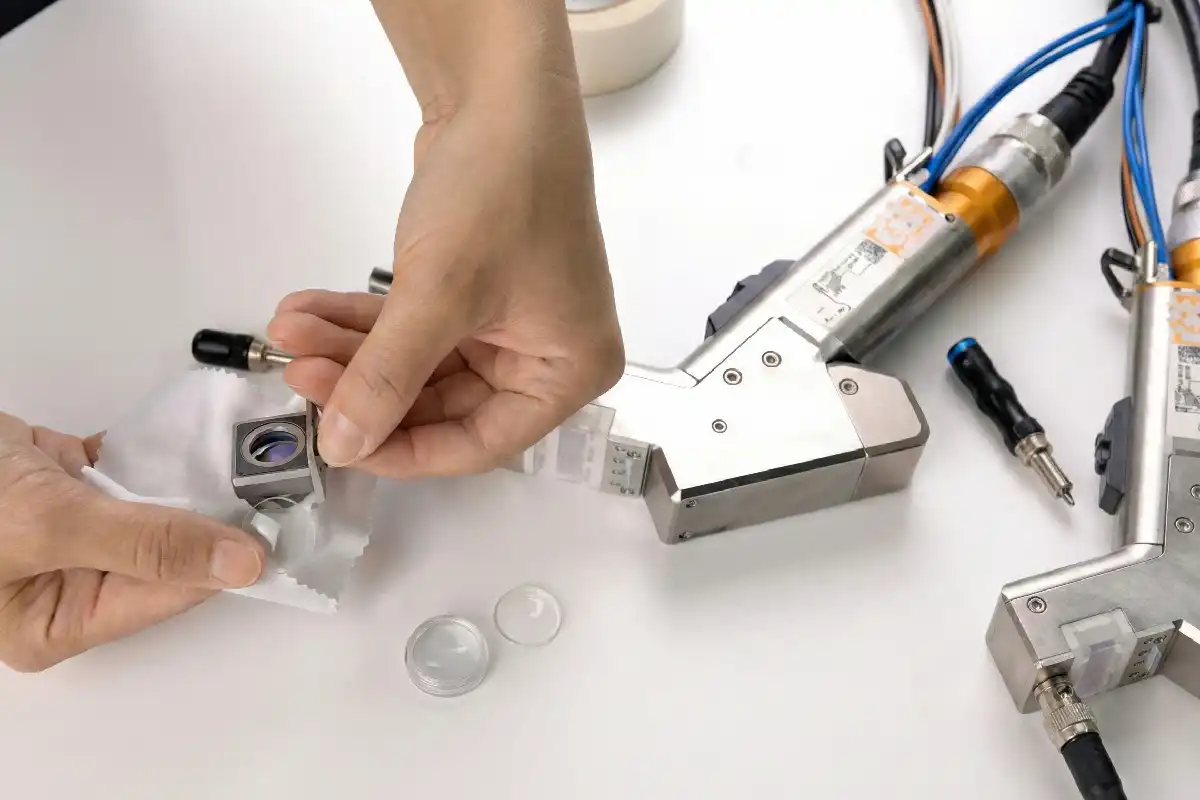
Replacing the protective lens on your Laser Welding Machine keeps you safe. It also helps your machine work better. If the lens is dirty or damaged, it can get too hot. This can make the machine not work well. You should follow these main steps: turn off and unplug the machine, get your tools, take out the screws, remove the old lens, seal the cavity, put in the new lens, put everything back together, and check if it lines up right. Always use the correct tools and follow safety rules. The table below shows why regular maintenance is important:
| Evidence Description | Impact on Performance and Safety |
|---|---|
| Dirt and damage on the cover lens can ‘cook’ the laser, causing the lens and performance to deteriorate. | Regular lens replacement stops overheating and keeps the machine working well. |
| Reflection from work surfaces or dirt can cause energy to be redirected into the laser head. | This redirection can mess up laser engraving or marking, and can make the machine break. |
| Cleaning the protective lens at least weekly is recommended. | Regular maintenance keeps the laser strong and working well. |
Doing these steps helps you not make mistakes and get the best results.
Key Takeaways
- Check and change the protective lens often. This keeps your laser welding machine safe and working well.
- Clean your workspace before you start. Gather all the tools you need for the lens replacement.
- Wear gloves and safety glasses to stay safe. These steps protect you when you change the lens.
- Hold the new lens by the edges when you put it in. Make sure it is lined up right after you install it.
- Look at and clean your machine every week. This helps your laser welding machine work its best.
Preparation for Laser Welding Machine Lens Replacement
Tools and Materials Needed
Get all your tools and materials before you start. This makes your work faster and safer. Use this checklist to help you:
- Hex wrench or screwdriver (for removing screws)
- Clean masking paper or lint-free wipes
- New protective lens (make sure it matches your model)
- Gloves (to keep fingerprints off the lens)
- Safety glasses
- Dust blower or compressed air
- Small container for screws
You also need a clean, soft cloth. This helps you hold the lens without scratching it.
Safety Precautions and Work Area Setup
Always unplug your Laser Welding Machine before you begin. This keeps you and the machine safe. If you forget, these things can happen:
- Possible damage to optical parts
- Lower weld quality
- More time fixing problems
- Safety risks for people
Set up your workspace in a bright, clean place. Take away anything you do not need from your table. Make sure the air is clean and has no smoke or dust. A good workspace helps you avoid mistakes and keeps the new lens clean.
Tip: Always wear gloves and safety glasses. This protects your hands and eyes from sharp things and dust.
Check the room before you start. The table below shows the best settings for your workspace:
| Parameter | Recommended Range | Impact of Deviation |
|---|---|---|
| Ambient Temperature | 15℃ to 30℃ (59℉ to 86℉) | If it is too hot or cold, problems like overheating or water drops can happen. |
| Relative Humidity | 30% to 65% | Too much water in the air can cause rust; too little can cause static electricity. |
| Air Quality & Dust Control | Clean and well-ventilated | Dust can block the lens and make the machine weaker; flying dust can catch fire. |
When you do these things, you keep your Laser Welding Machine safe and make changing the lens easier.
Laser Welding Machine Lens Replacement Steps
Power Down and Unplug
- Turn off your Laser Welding Machine.
- Unplug the power cord from the wall.
- Wait for the machine to cool down before you touch any parts.
Tip: Always wear clean clothes and wash your hands with soap before you start. Put on sterilized, thin gloves. This keeps the lens free from fingerprints and dirt.
Remove Lens Holder Screws
- Find the screws that hold the lens holder in place.
- Use a hex wrench or screwdriver to loosen and remove these screws.
- Place the screws in a small container so you do not lose them.
Extract Old Protective Lens
- Gently slide out the lens holder or drawer.
- Carefully lift out the old protective lens. Hold the lens by the edges. Do not touch the surface.
- Check the lens for signs of wear or damage.
Sign of Wear/Damage Description Foreign Objects or Burnt Spots Check for any foreign objects or burnt black spots on the lens. Reduced Laser Power If the laser power suddenly becomes low, it indicates potential lens damage. Abnormal Laser Output Irregular beam patterns or energy fluctuations suggest lens issues.
- You may also notice longer processing times, system alerts, or error codes about optics. These are signs that you need to replace the lens.
Seal Cavity with Masking Paper
- Use clean masking paper or lint-free wipes to seal the open cavity where the lens sits.
- Make sure the paper covers the opening completely.
Sealing the cavity with masking paper is very important. This step keeps dust from entering the cavity. Dust can lower the performance of your Laser Welding Machine and cause problems with the optical system.
Insert New Protective Lens
- Dampen a dust-free cloth with alcohol. Gently wipe around the lens area to remove dust.
- Wash your hands again and put on clean gloves.
- Take the new protective lens. Hold it by the edges only.
- Place the new lens into the holder. Press it tightly into the sealing ring so it fits well.
- Put the lens retaining ring back on top of the lens.
Note: Never touch the lens surface. Even a small fingerprint can block the laser beam.
Reassemble and Check Alignment
- Slide the lens holder or drawer back into the Laser Welding Machine.
- Tighten the screws to secure the holder.
- Remove the masking paper from the cavity.
- Reassemble the housing or cover of the machine.
- Look at the lens and holder to make sure everything sits flat and secure.
- Plug in the machine and turn it on.
- Test the machine with a low-power laser. Check if the beam lines up correctly.
If you see any problems with the beam, turn off the Laser Welding Machine and check the lens position again. Good alignment keeps your machine working safely and gives you the best results.
Safety Tips and Common Mistakes
Key Dos and Don’ts
You need to follow important safety rules when you replace the lens. These tips help you stay safe and keep your Laser Welding Machine in good shape:
- Wear clean clothes and wash your hands with soap before you start.
- Always use sterilized, thin gloves.
- Hold the lens by the edges. Never touch the surface.
- Do not blow on the lens. Use a dust blower or compressed air instead.
- Avoid using water or household cleaners on the lens.
- Keep your work area clean and free of dust.
- Always wear protective goggles and gloves.
- Use only original parts from the manufacturer.
- Inspect the protective lens every week.
- Use safety glasses and helmets rated for your machine’s laser.
Tip: Welders and anyone nearby should use filters and materials that match the laser’s wavelength.
Preventing Damage to Lens and Machine
You can avoid damage if you handle the lens and machine with care. Here are some common mistakes and how to prevent them:
- Do not use poor quality or unapproved lenses.
- Never install the lens incorrectly.
- Keep the lens away from moisture, especially when the machine is hot.
- Make sure the area stays clean during the whole process.
- Do not use the wrong cleaning methods or tools.
- Always seal the cavity well to block dust.
- Replace damaged lenses right away.
- Maintain good airflow in your workspace to reduce fumes.
- Use only original lenses.
- Prevent dirt or dust from getting on the lens during replacement.
- Replace damaged safety glasses as soon as you notice a problem.
Ensuring Proper Installation
You must install the new lens the right way to get the best results. Follow these steps:
- Remove the old lens and its holder carefully.
- Clean the new lens with a lint-free wipe and alcohol. Wipe from the center out in a spiral.
- Wait for the lens to dry before you install it.
- Hold the new lens by the edge and place it in the holder.
- Tighten all fixtures so the lens sits flat and secure.
- Test the machine at low power to check the beam alignment.
If you follow these steps, you will keep your machine working well and stay safe.
If you follow each step, you stay safe. Your Laser Welding Machine also stays safe. Cleaning often and checking the machine helps it last longer. It also helps the machine work better. The table below explains how these steps protect your equipment:
| Evidence Type | Description |
|---|---|
| Regular Inspection | Looking at wires and switches stops accidents and keeps the machine working well. |
| Cleaning Components | Cleaning the lens and other parts stops damage and keeps the laser beam strong. |
| Scheduled Servicing | Doing service on time helps the machine break less and last longer. |
If you are not sure what to do, read your manual. You can also ask a professional for help.
FAQ
How often should you replace the protective lens?
You should check the lens every week. Replace it if you see dirt, scratches, or burn marks. Regular checks keep your machine safe and working well.
What should you do if the new lens gets dirty during installation?
Stop and clean the lens with a lint-free wipe and alcohol. Hold the lens by the edges. Never use your fingers or a dirty cloth.
Can you use any type of lens for your laser welding machine?
Always use the lens made for your machine model. Using the wrong lens can cause poor performance or damage.
What if the laser beam does not align after replacement?
- Turn off the machine.
- Check if the lens sits flat and tight.
- Reinstall the lens holder.
- Test again at low power.
If the problem stays, ask a professional for help.
How to extend the service life of laser welding protective lenses
Top 5 Reasons for Laser Welding Lens Explosions & Solutions
Why cold cracks are more likely to occur during welding in winter



