
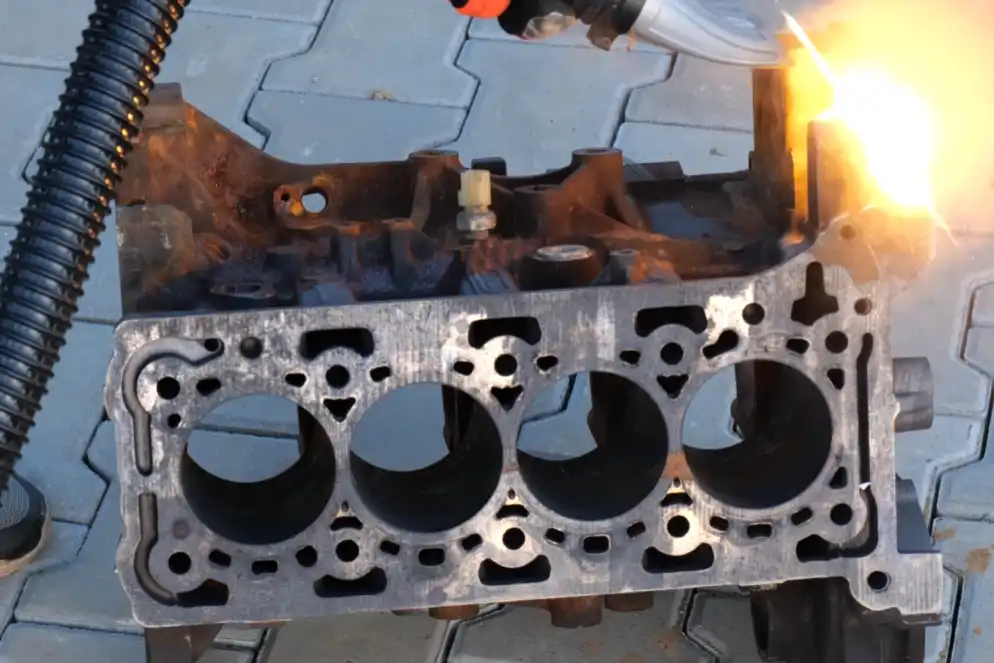
You should always use protective measures when using a laser cleaning machine. Laser radiation can hurt your eyes and skin. Fumes and small particles can make it hard to breathe. You need to wear the right personal protective equipment, like goggles, gloves, and masks. Set up safety enclosures to stop stray beams. Keep your workspace clean and organized before you start. Training helps you learn about the risks and how to stay safe. Your safety depends on good planning and smart choices.
Key Takeaways
- Always wear personal protective equipment like goggles, gloves, and masks. This helps protect you from laser radiation and bad fumes.
- Set up safety enclosures to block stray laser beams. Only trained people should be allowed in the area.
- Make sure your workspace has good ventilation. This removes bad fumes and particles made during laser cleaning.
- Check your laser cleaning machine before you start work. This helps you find any problems early.
- Follow safe operating steps. Know where the laser beam goes and do not look at it directly.
- Keep your workspace neat and free of things that can catch fire. This lowers the chance of fire or accidents.
- Take part in safety training and refresher classes often. This helps you learn the best ways to stay safe and what to do in emergencies.
- Keep good records of maintenance and safety checks. This helps you follow rules and make safety better.
Laser Cleaning Risks

Laser cleaning machines help take off rust, paint, or dirt. You need to know the risks before using them. These machines use strong lasers that can hurt you if you are not careful. You should learn about radiation dangers, breathing in fumes or particles, and fire or explosion risks.
Radiation Hazards
Laser cleaning equipment has strong beams. These beams can hurt you if you touch them or if they bounce off things. You need to follow safety rules and listen to industry laws to keep safe.
Eye and Skin Exposure
Your eyes and skin can get hurt by laser radiation. Direct laser radiation can hurt your eyes and burn your skin. Reflected laser light can also cause harm. Even a quick flash can make you lose your eyesight forever. You must wear protective eyewear to keep your eyes safe from direct and reflected beams. Shields around the machine help stop stray laser light.
Note: The Maximum Permissible Exposure (MPE) is the most laser energy you can safely handle. International rules, like BS EN IEC 60825-1:2014, set strict limits for exposure and say you must use safety gear and barriers.
Fume and Particle Risks
Laser cleaning makes more than just light. It also makes fumes and tiny bits. When the laser hits a surface, it can send out nanoparticles and volatile organic compounds (VOCs) into the air. Stronger lasers make more particles float in the air. Most of these bits are very small, but you can catch them with a HEPA filter. You should always wear masks and make sure your workspace has good airflow.
- Airborne nanoparticles can get into your lungs.
- VOCs can give you headaches or make it hard to breathe.
- HEPA filters help keep the air clean.
Fire and Explosion
Laser cleaning machines use a lot of power. This can make sparks or heat. If flammable things are close by, you could start a fire or cause an explosion. You must move anything that can burn away from your work area. Always keep a fire extinguisher nearby.
- Sparks from the laser can light dust or chemicals.
- Electrical problems can start a fire.
- Getting your workspace ready helps lower these risks.
You must use protective measures every time you use a laser cleaning machine. Knowing these risks helps you stay safe and avoid accidents.
Protective Measures for Operators
Laser cleaning machines can be risky if you do not use the right protective measures. You need to keep yourself safe from laser radiation, fumes, and flying particles. The best way to stay safe is to use personal protective equipment, set up safety enclosures, and make sure your workspace has good airflow.
Personal Protective Equipment (PPE)
You must wear the right PPE every time you use a laser cleaning machine. PPE helps protect you from burns, eye injuries, and breathing problems. Here are the most important types of PPE for laser cleaning:
- Laser safety glasses block harmful laser light and keep your eyes safe from direct and reflected beams.
- Protective clothing, like flame-resistant jackets and long sleeves, keeps your skin safe from burns and flying debris.
- Respiratory protection, such as face masks or respirators, filters out dangerous fumes and tiny particles.
- Gloves keep your hands safe from heat and laser exposure.
- Face shields give extra protection for your face against laser light and debris.
- Hearing protection helps stop hearing loss from loud equipment.
- Safety helmets protect your head from bumps and some laser radiation.
Tip: Always make sure your PPE meets safety rules. The Laser Safety Officer should check your eyewear and other gear before you start work.
Safety Goggles
You need to wear safety goggles that block the right wavelength of your laser. Goggles must fit well and cover your eyes fully. The ANSI Z136 standards say you must use eye protection when working with Class 3b or Class 4 lasers. Your goggles may look like regular glasses, but they have special filters to block laser light.
| PPE Standard | Requirement |
|---|---|
| ANSI Z136 | Eye protection is needed for Class 3b and 4 lasers. |
| LSO Approval | Laser Safety Officer must check all protective eyewear. |
| Eyewear Types | Goggles, face shields, or prescription glasses with laser filters. |
Face Masks
Face masks help you breathe safely when laser cleaning makes fumes and particles. You should use masks that filter out nanoparticles and VOCs. Respirators with HEPA filters work best for laser cleaning jobs. These masks keep bad substances out of your lungs.
Gloves and Clothing
Wear gloves that keep your hands safe from heat and laser exposure. Pick gloves made for high temperatures and laser work. Put on flame-resistant clothing and long sleeves to keep your skin safe from burns and flying debris. Safety helmets add another layer of protection for your head.
Laser Safety Enclosures
Laser safety enclosures keep you safe by blocking stray laser beams and controlling who can get near the machine. These enclosures lower the risk of radiation exposure and help keep your workspace safe.
Enclosure Setup
You need to set up enclosures that meet safety rules. Good enclosures use strong materials that absorb or reflect laser light. They have safety locks that stop the laser if the enclosure is open. Enclosures should have windows so you can see inside without risking exposure.
| Design Requirement | Description |
|---|---|
| Safety Certification | ISO 13849 certified for important safety features. |
| Ventilation and Fume Management | Built-in systems remove bad gases and improve air quality. |
| Material and Durability | Strong materials absorb or reflect laser wavelengths. |
| Interlock Systems | Laser works only when enclosure is closed tight. |
| Visibility and Access | Windows let you watch safely. |
| Compliance with Standards | Meets ANSI Z136 rules for safe laser use. |
Note: If you need to open the enclosure for repairs, set up a temporary laser controlled area. Put up warning signs and wear full PPE before going in.
Access Control
Limit who can go into the laser cleaning area. Only trained and allowed people should enter. Safety enclosures help keep others safe by blocking laser beams and lowering the chance of accidents. Human access barriers make sure only the right people get close to the machine.
- Safety enclosures lower radiation levels to Class 1, keeping you and others safe.
- They absorb and spread out reflections, lowering the risk of eye injuries.
- Access is limited to allowed people, which helps stop accidents.
Ventilation
Laser cleaning makes fumes and tiny particles that can hurt your health. You need good airflow to get rid of these dangers from the air.
Local Exhaust
Use local exhaust systems to pull fumes and particles away from your workspace. The exhaust volume must be strong enough to clear out smoke and gases. For small laser cutters, you need 150–300 cubic feet per minute (CFM). Bigger systems need more than 400 CFM.
| Application Type | Recommended CFM Range |
|---|---|
| Small laser cutters | 150–300 CFM |
| Larger systems/heavy-duty | >400 CFM |
Air Filtration
Air filtration systems clean the air by trapping bad particles. The best systems use HEPA and ULPA filters, which remove up to 99.9995% of contaminants. These systems often have several steps, including pre-filters and activated carbon, to catch fumes and particles. Air filtration keeps you from breathing in dangerous stuff and keeps your equipment clean.
| Feature | Description |
|---|---|
| Filtration Efficiency | HEPA/ULPA filters remove up to 99.9995% of airborne contaminants. |
| Multistage Filtration | Pre-filters, HEPA/ULPA, and activated carbon for full fume removal. |
| Safety | Keeps you safe from breathing risks and keeps equipment safe. |
| Compatibility | Works with laser optics to catch fumes at the source. |
| User-Friendly Features | Quiet housings and easy control panels. |
Tip: Always check your ventilation and filtration systems before you start work. Clean or change filters as needed to keep the air safe.
You must use protective measures every time you use a laser cleaning machine. PPE, safety enclosures, and ventilation work together to keep you safe from laser radiation, fumes, and flying debris.
Equipment Safety Protocols
Laser cleaning machines need careful use. You must follow safety steps before and during use. These steps help you avoid accidents. They also keep your equipment working well.
Pre-Operation Checks
Check your machine before you start. This helps you find problems early. It also keeps you safe.
Machine Inspection
Inspect your laser cleaning machine every time before use. Look for loose cables or damaged parts. Check for leaks. Make sure the cooling system works. If the cooling system fails, the machine can get too hot. It may shut down. Check the laser source for wear or damage. If the laser source fails, call a professional for repairs.
| Equipment Failure | Description |
|---|---|
| Cooling System Failure | Needed to keep the machine cool; failure can make it overheat and stop working. |
| Laser Source Failure | Main part; if it fails, you need a professional to fix or replace it, which causes downtime. |
Check the setup and calibration too. Make sure all parts are lined up. Calibrate the laser for the material you want to clean. Test the safety systems. Try the emergency stop buttons.
| Pre-operation Check | Description |
|---|---|
| Proper Setup | Make sure everything is lined up, the laser is set for the material, and safety systems work. |
| Calibration | Set the laser power and focus for the job to avoid damage or danger. |
| Continuous Monitoring | Watch laser power, material temperature, and fume removal while working. |
| Emergency Stops | Put emergency stop buttons where you can reach them fast in case of trouble. |
Tip: Put emergency stop buttons where you can reach them quickly.
Interlock Systems
Interlock systems help protect you from accidents. These systems turn off the laser if someone opens the enclosure or moves a safety barrier. Test interlocks before each use. If an interlock does not work, do not use the machine until it is fixed.
Safe Operating Procedures
Follow safe steps every time you use a laser cleaning machine. These steps help you avoid injuries. They also keep your workspace safe.
Beam Path Awareness
Know where the laser beam goes. Use alignment tools to check the beam path. Watch for changes. If the beam is not straight or centered, adjust it with the machine’s controls.
- Use alignment tools or follow the machine’s alignment steps.
- Check for changes in the beam path.
- Adjust the beam if it is not lined up.
Avoiding Direct Exposure
Never put your hands or face near the beam. Wear laser safety gear like glasses, gloves, and protective clothing. Work in a place with good airflow and fume extractors. Secure the machine and the workpiece so they do not move. Know your beam settings. Follow the startup and shutdown steps from the manufacturer. Make sure every operator has training and certification.
- Wear laser safety gear.
- Work in a place with good airflow.
- Secure the workpiece and machine.
- Know your beam settings.
- Follow startup and shutdown steps.
- Train every operator well.
Alert: Direct exposure to the laser beam can hurt you badly. Always pay attention and follow safety rules.
Workspace Preparation
Getting your workspace ready helps you stay safe. It also helps you work faster and better. You should organize your area, fix cables, and keep flammable things away from the laser. Good planning lowers risks and makes your job easier.
Organizing the Area
A clean workspace helps you focus on your job. You work better when you know where things are. Set up your area before you start laser cleaning.
- Keep your workspace neat and free of clutter. This helps you avoid accidents and keeps you focused.
- Put tools, safety gear, and waste bins in special spots. You can find what you need quickly.
- Make clean zones and dirty zones. This keeps dust away from important equipment.
Tip: When your workspace is organized, you see dangers faster and get more done.
Cable Management
Loose cables can make you trip or get stuck in moving parts. You need to fix cables to keep your area safe.
- Tie cables together with covers or ties.
- Run cables along walls or under tables. This keeps walkways open.
- Label cables so you know which one goes to each machine.
| Cable Management Task | Benefit |
|---|---|
| Bundle cables | Stops people from tripping |
| Route along walls | Keeps paths clear |
| Label cables | Makes fixing problems easier |
Clear Work Zones
You need clear work zones to move safely and use your laser cleaning machine. Use tape or barriers to mark the laser area. Only trained people should go inside this zone. Take out things you do not need before you start.
- Mark the laser area with tape or signs.
- Keep tools and materials outside the laser zone.
- Make sure emergency exits are easy to reach.
Flammable Materials
Laser cleaning can make sparks and heat. You must keep flammable things away from your workspace. This lowers the chance of fire or explosion.
Removal and Storage
Take out all flammable items from the laser area. Put chemicals, paper, and oily rags in safe containers away from the machine. Check materials before use so you do not use ones that make toxic fumes or catch fire easily. Ask suppliers for safety warnings about new materials.
- Take flammable items out of the workspace.
- Store chemicals in sealed, labeled containers.
- Read material safety sheets before cleaning.
Alert: Some surfaces may hide flammable stuff. Always check before you start.
Fire Extinguishers
You need a fire extinguisher near your laser cleaning machine. Make sure it is the right kind for your workspace, like CO₂ or dry chemical. Learn how to use it and teach others too. Check that the extinguisher is easy to reach and not blocked.
- Put fire extinguishers near exits and laser machines.
- Check extinguishers often to make sure they work.
- Learn how to use them in emergencies.
| Fire Safety Practice | Why It Matters |
|---|---|
| Accessible extinguisher | Quick response to fire |
| Regular inspection | Makes sure it is ready |
| Operator training | Helps you stay calm and safe |
Note: Automatic fire systems give extra safety. These systems can turn off the laser if they sense smoke or heat.
A ready workspace keeps you safe and helps you work better. Organize your area, fix cables, and keep flammable things away from the laser. Always check your fire safety gear before you start.
Operator Training

Laser cleaning machines need people who know what they are doing. You must learn how to use the equipment the right way. Training helps you see the dangers and how to stay safe. Good training keeps everyone safe at work.
Safety Training
You need safety training before you use a laser cleaning machine. Training teaches you about laser dangers, safe habits, and what to do in emergencies. You learn how to wear protective gear and follow safety rules.
Initial Instruction
Start with simple lessons. You learn about laser physics, cleaning ways, and machine types. You study how lasers work and how they clean things. You also learn about the dangers of laser beams and how to stay away from them.
| Training Module | Focus Area |
|---|---|
| Laser Physics | Understanding wavelength, power levels, beam intensity, and pulse duration. |
| Mechanisms of Laser Cleaning | Learning how laser ablation removes contaminants while preserving the substrate. |
| Types of Laser Cleaning Systems | Exploring pulsed vs. continuous-wave lasers and their applications. |
| Laser Classification & Risk Assessment | Understanding laser hazard levels and safety implications. |
| Personal Protective Equipment (PPE) | Proper selection and usage of laser safety goggles, gloves, and protective clothing. |
| Emergency Procedures | Learning appropriate responses to accidental exposure and equipment malfunctions. |
| User Interface & Settings | Learning how to adjust laser power and settings based on material type. |
| Workplace Safety Standards | Understanding best practices for setting up a secure laser cleaning environment. |
| Industry Certifications | Pursuing certifications such as Laser Safety Officer (LSO). |
You practice using the machine controls. You learn how to set the laser power and change settings for different jobs. You also learn how to get your workspace ready and use safety barriers.
Tip: Ask questions if you do not understand something. Your trainer can help explain things.
Refresher Courses
You need refresher courses to keep your skills strong. These classes help you remember safety steps and learn new rules. You go over emergency steps and practice using your safety gear. You also learn about new technology and changes in safety rules.
- Take refresher courses every year.
- Go over emergency steps and safety gear.
- Learn about new laser cleaning technology.
Note: Refresher training helps you avoid mistakes and keeps you ready for anything.
Certification
Certification shows you know how to use laser cleaning machines safely. You can get certified online or in person. Many programs teach you about laser safety, how to use the machine, and what to do in emergencies.
| Certification Program | Description |
|---|---|
| Online Laser Safety Certification | Get your team certified completely online. Whether you have 10 employees or 100, certification in laser safety has never been easier. |
| Laser Safety Certification & Online Training | Prepare for safe and compliant operation of laser equipment in the industrial, healthcare, and cosmetic sectors with our Laser Safety Training and Certification. |
| Industrial Laser Operator | Develop skills in laser cutting technology with hands-on practice in CO2 industrial laser operation, blueprint reading, laser safety and computer-assisted programming. |
| On-site Laser Safety Certification | This training takes place on-site at the customer’s facility and typically spans 2-3 days. A tailored training schedule will be made to specifically match all of the areas of focus your operators will require based on the needs of your application, system, and facility. |
Pick a certification that fits your job and machine. Some programs let you practice with real machines. Others let you learn online at your own speed.
Alert: Certified operators help keep everyone safe at work. Certification proves you know how to follow safety rules and handle emergencies.
Process Monitoring
You have to watch the laser cleaning process very carefully. Watching closely helps you find problems early and keeps you safe. New machines use smart tools and sensors so you can see what is happening right away.
Real-Time Observation
There are different tools you can use to watch cleaning as it happens. These tools help you check if your work is safe and good.
Monitoring Output
You should look at the results after each cleaning pass. Some machines have cameras and sensors that show you the cleaned surface. Advanced systems use deep learning and neural networks to guess how the surface will look after each laser pulse. Acoustic wave analysis lets you listen for changes in the surface, so you know if cleaning is working well. Convolutional neural networks (CNNs) can look at pictures before and after cleaning to guess how clean the surface is. Machine learning models help you know if the process is working, especially when cleaning tough paint layers.
| Technology Used | Description |
|---|---|
| Deep Learning & Neural Networks | Predicts how the sample will look after each laser pulse. |
| Acoustic Wave Analysis | Monitors cleaning quality and surface roughness in real time. |
| Convolutional Neural Networks | Uses images and laser settings to predict cleanliness. |
| Machine Learning-based Prediction | Improves cleaning of composite paint layers. |
Tip: Use these tools to check your work as you go. You can fix problems before they get worse.
Detecting Abnormalities
You need to notice anything strange during cleaning. Watch for changes in color, smoke, or sound. Sensors can warn you if something is not right. If you see sparks, too much smoke, or uneven cleaning, stop and check your settings. Smart systems can warn you about overheating or blocked airflow.
- Look for changes in the cleaned area.
- Listen for odd sounds.
- Watch for extra smoke or sparks.
- Use sensors and cameras to help you find problems.
Automated Safety Features
Laser cleaning machines have safety systems built in. These features help you avoid accidents and keep your workspace safe.
Emergency Shutoff
You must know how to stop the machine quickly. Emergency stop buttons let you turn off the laser right away if something goes wrong. Key switches stop people who are not trained from using the machine. Interlocks turn off the laser if someone opens a cover or panel.
| Safety System | Functionality |
|---|---|
| Emergency Stop Buttons | Shuts down the laser instantly in an emergency. |
| Key Switches | Stops unauthorized use of the machine. |
| Interlocks | Disables the laser when covers or panels are opened. |
Alert: Always know where the emergency stop button is before you start.
Alarms
Alarms warn you if something is wrong. Machines may beep or flash lights if they find a problem. Some systems have alarms for overheating, blocked airflow, or open panels. Fume extractors and vacuum tables help keep the air clean and the workspace safe. Safe viewing windows let you watch the process without hurting your eyes.
| Safety Feature | Description |
|---|---|
| Manual Reset | Stops accidental activation of the laser. |
| Key-Locked Power Switch | Only lets trained people use the machine. |
| Remote Interlock Connector | Turns off the laser if the system is tampered with. |
| Fume Extractor | Removes dangerous fumes during cleaning. |
| Vacuum Table | Keeps the workpiece stable and safe. |
| Safe Viewing | Lets you observe cleaning without exposure to laser beams. |
Note: Safety features work best when you check them before each job. Make sure alarms and shutoff systems are ready to use.
Emergency Procedures
Laser cleaning can be dangerous. You must know what to do if something goes wrong. Quick action keeps you and others safe. You need to learn how to respond to fires, medical emergencies, and how to evacuate the area.
Incident Response
Accidents can happen fast. You must act quickly and follow the right steps. Here is what you should do if an accident happens during laser cleaning:
- Power down the machine right away.
- Do not rub your eye if it gets hurt. Rubbing can make the injury worse.
- Rinse the eye gently with clean water or saline.
- Cover the eye with a clean cloth or eye patch.
- Seek professional medical help as soon as possible.
If an accident happens while you are working:
- Stop the machine and clear the area.
- Use your first aid kit for burns, cuts, or other injuries.
- Call emergency services if the injury is serious.
- Log the incident and review what happened to prevent future accidents.
- Contact a safety expert if you are unsure what to do next.
Fire Protocols
Laser cleaning can cause sparks. You must know how to handle a fire. Keep a fire extinguisher close to your workspace. If you see smoke or flames:
- Turn off the laser machine.
- Use the fire extinguisher to put out small fires.
- Evacuate the area if the fire grows.
- Call the fire department for help.
Alert: Never try to fight a large fire by yourself. Leave the area and get help.
Medical Emergencies
You may face burns, eye injuries, or breathing problems. You need to act fast. Use your first aid kit for minor injuries. For serious injuries:
- Call emergency services.
- Help the injured person stay calm.
- Do not move someone with a serious injury unless you must.
- Give details about the accident to medical staff.
Evacuation
Sometimes you must leave the area quickly. You need to know the evacuation routes and how to find them.
Routes and Marking
Look for marked exits and follow the signs. Your workspace should have clear paths to the exits. Emergency routes must be easy to see and free from clutter.
| Evacuation Step | What You Should Do |
|---|---|
| Find the nearest exit | Look for signs and arrows |
| Stay calm | Walk, do not run |
| Help others | Assist anyone who needs help |
| Gather at meeting point | Go to the safe area outside |
Tip: Practice evacuation drills so you know what to do in an emergency.
Reporting
After an emergency, you must report what happened. Reporting helps prevent future accidents.
- Write down the details of the incident.
- Include the time, place, and what caused the accident.
- Share the report with your supervisor or safety officer.
- Review the event and talk about ways to improve safety.
Note: Good reporting helps everyone learn and stay safe.
Maintenance and Waste Management
Taking care of your laser cleaning machine helps you stay safe. It also helps you get better results. You should clean the machine, change old parts, handle waste, and keep records. These steps protect you, your equipment, and the environment.
Routine Maintenance
Check your machine often. Regular checks help stop problems before they happen. Clean parts and change worn items to keep things working well.
Cleaning Schedules
Make a cleaning plan for your laser cleaning machine. Clean the optics so the laser beam stays strong. Check the cooling system to stop overheating. Wipe surfaces to get rid of dust and debris.
| Maintenance Task | Description |
|---|---|
| Keep the Optics Clean | Look at and clean optical parts to keep the laser beam strong. |
| Monitor the Cooling System | Check coolant and clear blockages to stop overheating. |
| Inspect and Replace Wearable Parts | Find worn seals and filters and change them to avoid breakdowns. |
| Update Software and Firmware | Add updates to make safety and performance better. |
| Train Your Operators | Make sure everyone knows how to use the machine and follow safety rules. |
Tip: Write down each cleaning and check in a logbook. This helps you remember what you did and when.
Part Replacement
Change parts that wear out, like filters and seals. Use parts from trusted suppliers. Look in the manual for the right part numbers. If you hear odd noises or see warning lights, stop and check the machine.
Waste Disposal
Laser cleaning makes waste like dust, residue, and old parts. You need to handle this waste safely.
Residue Handling
Follow these steps to get rid of waste from laser cleaning:
- Talk to your Environmental Health & Safety (EH&S) group about disposal.
- Trade old lasers with your supplier or manufacturer.
- Give or sell equipment to another group if you can.
- Send used machines back to the manufacturer for safe disposal.
- Use local e-waste recycling programs for electronics.
Alert: Never put laser waste in regular trash. Special rules apply to hazardous materials.
Environmental Compliance
You must follow rules that protect the environment. These rules cover waste, air emissions, and noise.
| Regulation Type | Description |
|---|---|
| Waste Management | Get rid of laser cleaning waste the right way. |
| Emission Monitoring | Check air emissions to meet environmental standards. |
| Noise Control Standards | Keep noise low to avoid hurting the environment. |
Note: Local and national laws may ask you to report how you handle waste and emissions.
Record Keeping
Good records help you track maintenance, safety, and waste disposal. You need to write down every task and keep papers for inspections.
| Log Entry Category | Details to Record |
|---|---|
| Basic Information | Date/time, technician name, equipment serial number, location. |
| Task Performed | What you did (e.g., “Cleaned focusing lens,” “Replaced water filter”). |
| Equipment Condition | Status before and after maintenance (e.g., “Pre: Power output 85W; Post: 98W”). |
| Parts Used | Part number, quantity, supplier. |
| Test Results | Power readings, alignment checks, safety test outcomes. |
| Issues Identified | Problems found (e.g., “Pump makes grinding noise”). |
| Follow-Up Actions | Tasks to finish later (e.g., “Calibrate power meter in 2 weeks”). |
- You must keep records to meet rules from groups like the FDA and OSHA.
- If you do not keep good records, you could get fined or have legal trouble.
Tip: Keep your records in a safe place. Look at them often to find patterns or problems.
Taking care of your machine and waste keeps you safe. It also helps the environment. Good habits and careful records make your work easier and safer.
You stay safest when you use protective steps every time. Always wear your personal protective equipment. Put up safety barriers around your work area. Check your workspace before you start. Stay careful and follow safety rules from groups like the FDA, OSHA, and ANSI.
- Class IV laser systems need very strict safety steps and locked panels.
- PPE and enclosures protect you from infrared radiation.
- Local laws might have more rules for owners.
Keep learning about new safety standards and change your habits when needed. Make sure everyone at work cares about safety.
FAQ
What type of goggles should you wear for laser cleaning?
Wear laser safety goggles that match your machine’s wavelength. Look at the label for the right Optical Density rating. If you are not sure, ask your Laser Safety Officer.
How often should you check your laser cleaning machine?
Check your machine before you use it every time. Look for loose cables and broken parts. Test the safety systems. Regular checks help you find problems early.
Can you use a regular dust mask during laser cleaning?
No, you cannot use a regular dust mask. You need a mask or respirator with a HEPA filter. Regular dust masks do not block tiny particles or fumes from laser cleaning.
What should you do if a fire starts during laser cleaning?
Turn off the laser machine right away. Use a fire extinguisher if the fire is small. If the fire gets bigger, leave the area and call emergency services.
Who can enter the laser cleaning area?
Only trained and allowed people can go in. Safety enclosures and warning signs keep others out. You must follow the access control rules.
How do you dispose of laser cleaning waste?
Follow local rules for hazardous waste. Put dust and residue in sealed containers. Ask your Environmental Health & Safety team for help.
Is operator training required for laser cleaning?
Yes, you need safety training before using a laser cleaning machine. Refresher courses help you learn new rules and technology.
What is the best way to keep your workspace safe?
Keep your area clean and neat. Take away flammable things. Mark work zones with tape or signs. Check fire extinguishers and emergency exits before you start.
See also
Continuous or Pulsed Laser Cleaning Machine Which Suits Your Needs
The advantages of laser rust removal technology in ship maintenance
The advantages of laser cleaning in the automotive industry
What Factors Affect the Lifespan of Fiber Laser Cleaning Machines



