
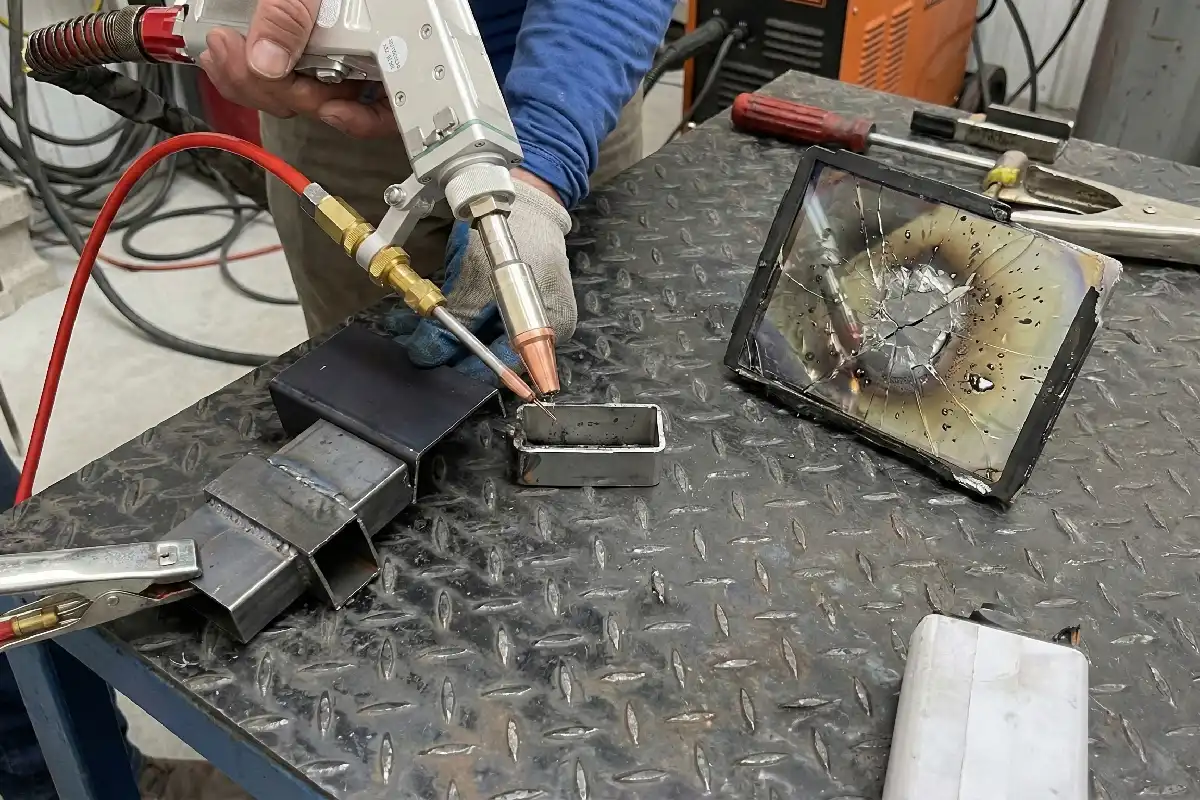
You need to change the protective lens if you see deep scratches, burns, cracks, or color changes. If the lens does not let light through well or makes the machine lose power, you should throw it away. Checking and cleaning the lens often keeps you safe and helps your welding look good. Industry standards help you know what to do:
- ANSI Z136.1-2022 tells you how to use lasers safely.
- ANSI Z136.1 gives you rules for keeping the lens safe.
A broken lens can make the machine work worse and make things more dangerous.
Key Takeaways
- Check the protective lens every day for scratches, burns, or color changes. Finding problems early stops accidents and keeps welding safe.
- Change damaged lenses right away. Waiting to replace them can cause bigger repairs and safety problems.
- Follow ANSI Z136.1 safety standards and what the manufacturer says. Following these rules keeps you safe and makes welding better.
- Clean the lens the right way with the right tools. A clean lens helps the laser work well and makes the machine last longer.
- Write down when you check and change the lens. Good records help you remember maintenance and follow safety rules.
Why Scrap Standards Matter
Safety and Compliance
You must follow scrap standards for protective lenses to stay safe. If you do not follow these rules, you could get hurt. Overheating and damage can happen if you ignore them. This can be very dangerous. Checking and taking care of the lens helps it work well. It also keeps you safe from laser radiation. You should always wear laser safety eyewear with the right optical density. This keeps your eyes safe from laser exposure.
- Following scrap standards stops overheating and damage.
- Checking the lens often protects you from laser radiation.
- Wearing the right safety eyewear lowers the chance of eye injuries.
Tip: Always look at your lens before you start welding. If you see damage, change it right away.
Welding Quality and Machine Life
A clean and good lens lets the laser beam go through easily. This helps your welds stay strong and smooth. If you forget to clean or change the lens, your equipment can get damaged. You might also get bad welding results. Taking care of the lens protector is important because you can change it easily. This stops dirt and gas from hurting your machine. Picking high-quality lenses helps your machine last longer and work better.
- Change lens protectors often so they do not get damaged.
- Clean the lens to stop problems when welding.
- Put your laser gun in a safe place to keep dust away.
Taking care of the lens helps your machine work well and last longer. Good habits with lens care save you time and money.
Protective Lens Scrap Criteria
Visual Inspection
You need to check the protective lens before you use your laser welding machine. Look for any damage on the lens. Scratches, burns, cracks, and color changes mean you should replace the lens. You can spot some defects easily if you know what to look for. The table below shows common problems and what causes them:
| Visual Defect Type | Cause of Defect |
|---|---|
| Damage to convex surface of lens | Pollution leading to dot-like black spots |
| Damage to flat surface of lens | Laser diffuse reflection causing white spots |
If you see black spots or white spots, you know the lens has damage. These marks can block the laser beam and make welding unsafe. You should not use a lens with these defects.
Note: Always inspect both sides of the lens. Even small marks can affect your safety and the quality of your weld.
Performance Issues
Sometimes, you cannot see the damage with your eyes. You need to watch for signs that the protective lens does not work well. If the lens does not let enough light through, the laser loses power. You may notice poor welds or more spatter. The machine may not cut or join metal as well as before. These problems mean the lens needs to be replaced.
You should also check for reduced transmission. If the laser beam looks weak or uneven, the lens may have hidden damage. You must change the lens to keep your machine working right.
Tip: If you see power loss or more spatter, check the lens first. A new lens can fix these problems quickly.
Manufacturer Guidelines
You must follow the steps from the manufacturer when you scrap a protective lens. Leading companies give clear instructions to help you stay safe and keep your machine in good shape. Here is what you should do:
- Prepare your workspace. Make sure it is clean and dust-free. Wear dust-free gloves. Gather all materials, such as dust-free cloths, cotton swabs, cleaning agents, and a new protective lens.
- Remove the old lens. Unscrew the copper nozzle fixture. Use the right tools to take out the damaged lens carefully.
- Clean the lens. Blow away dust. Use a cotton swab with alcohol to clean the lens in a spiral motion. Repeat with a clean swab.
- Replace the lens. If you see damage that you cannot fix, throw the lens away. Put in a new lens.
ANSI Z136.1 gives you rules for laser safety. You must follow these rules and the manufacturer’s advice. If you do not, you risk injury and poor welding results.
Alert: Never try to fix a lens with deep scratches or burns. Always use a new lens to protect yourself and your equipment.
Protective Lens Inspection and Cleaning
Inspection Frequency
You should look at the protective lens every day. Check it before you start welding. Look for dust, oil, splashes, or burn marks. Daily checks help you find problems early. If you see damage, change the lens before using the machine. Regular checks keep you safe and make your welds strong.
Tip: Always check both sides of the lens. Small marks can cause big trouble.
Most lenses are 18mm, 20mm, or 21.5mm. Some machines use 25mm or 30mm lenses. Knowing the size helps you pick the right cleaning tools and parts.
Cleaning Methods
Clean the lens gently so you do not scratch it. Use soft steps for light dirt. Blow away dust with a blower or cleaning air. Do not use air with oil or water. For stains or fingerprints, use a cotton swab with acetone or ethanol. Wipe softly and do not rub hard. If the lens is very dirty, use a swab with vinegar, wipe the lens, then use acetone to clean off leftovers. For heavy dirt, use an optical polishing solution. Press lightly and do not polish too much.
- Always wear gloves when you touch the lens.
- Do not touch the lens with bare fingers.
- Keep your work area clean to stop dust and dirt.
Note: Splashback, bad gas, dust, and fingerprints are common problems. These can scatter the laser, make it hard to focus, and even hurt the lens.
Documentation Practices
You need to keep good records for lens care. Write down each cleaning or replacement. This helps you follow safety rules and track your machine’s health. Use a log to record important details:
| Log Entry Category | Details to Record |
|---|---|
| Basic Information | Date/time, technician name, equipment serial number, location |
| Task Performed | Specific task (e.g., “Cleaned focusing lens,” “Replaced water filter”) |
| Equipment Condition | Pre/post status (e.g., “Pre: Power output 85W; Post: 98W”) |
| Parts Used | OEM part number, quantity, supplier |
| Test Results | Power readings, alignment checks, safety test outcomes (attach photos if needed) |
| Issues Identified | Unresolved problems (e.g., “Pump makes grinding noise—scheduled for replacement”) |
| Follow-Up Actions | Tasks to complete later (e.g., “Calibrate power meter in 2 weeks”) |
Good records help you stay safe and keep your machine working well.
Scrap Assessment Steps
Routine Checks
You should check the protective lens every day before you use your laser welding machine. This habit helps you find problems early and keeps your machine safe. Use your eyes to look for dust, oil stains, splashes, or burn marks. These signs show that the lens might not work well. If you see any of these, clean or replace the lens right away.
Here is a simple table to help you remember what to do each day:
| Frequency | Task | Inspection/Operation | Objective |
|---|---|---|---|
| Daily (before use) | Check the protective lens | Visually inspect for dust, oil stains, splashes, or burns | Ensure the optical path is clear and prevent damage to the focusing mirror |
Tip: Make daily checks a habit. This step is the most important for keeping your laser welding safe and effective.
Tools for Assessment
You need the right tools to check if the lens should be scrapped. Use a bright light and a magnifying glass to see small marks or spots. Follow these steps to assess the lens:
- Look for black spots on the lens. These can mean anti-slag problems or that the lens is overdue for replacement.
- Check for white spots in the center. These may show laser beam issues.
- Watch if the lens swings or moves oddly. This could mean misalignment or a problem with the sealing ring.
- Inspect the convex surface for pollution damage, which often looks like black spots.
- Examine the flat surface for white spots, which can come from laser reflection damage.
If you find any of these problems, you should replace the lens to keep your machine working well.
Record-Keeping
Good records help you track lens changes and spot patterns in damage. Write down each inspection, cleaning, or replacement. Note the date, what you found, and what you did. This log helps you see if problems happen often and reminds you when to check next.
Note: Keeping a simple logbook or digital record makes it easy to follow safety rules and keep your machine in top shape.
Common Mistakes to Avoid
Overlooking Minor Damage
Some people think small scratches or tiny spots are not important. This is a mistake. Even little damage can cause big trouble. Damaged lenses might not block harmful laser light. Your eyes can get hurt if you ignore these problems. You need to see clearly to make good welds. Scratches or burns can make it hard to see your work. If you cannot see well, your welds will be weak. Your machine will not work as well.
- Damaged protective lenses might not block harmful laser light. This can make eye injuries more likely.
- Lenses with damage can make it hard to see. Good visibility is needed for precise laser welding.
- Bad visibility can cause poor welds. This can hurt how well the welding machine works.
Tip: Always change a lens if you see any damage. Small problems can get worse fast.
Delaying Replacement
If you wait too long to change a damaged lens, it can cost you more. Using a scratched or dirty lens can cause more damage. Dirt or scratches can spread to the focusing lens. This makes repairs much more expensive. Lenses that are very damaged can scatter the laser beam. This can put you and others in danger.
| Risk Type | Description |
|---|---|
| Secondary Damage | Dirt or scratches can spread to the focusing lens. This can make repairs cost 3–5 times more. |
| Safety Hazards | Very damaged lenses can scatter the laser. This can be dangerous for people using the machine. |
Alert: Change the lens right away if you see damage. Acting fast keeps your machine safe and protects you.
Ignoring Standards
You need to follow safety standards like ANSI Z136.1 and the manufacturer’s rules. If you ignore these, accidents can happen. Your welding may not turn out well. Standards tell you when to check, clean, and change your lens. Skipping these steps can cause injuries and expensive repairs. Always look at the latest safety rules and follow them.
Note: Standards help keep you and your equipment safe. Make them part of what you do every day.
When you follow scrap standards for protective lenses, you keep your eyes safe. You also help your welds look better. If you check and clean the lens often, you can find dirt or damage early. Change the lens right away if you see any problems. This helps stop accidents and keeps your machine working well. A clean workspace and the right tools make your job safer.
- Protective lenses stop harmful rays and help you see clearly.
- Checking and changing lenses often keeps you safe.
- Following safety rules lowers injuries and makes welding better.
FAQ
How often should you replace a protective lens?
You should replace the lens when you see scratches, burns, or color changes. If you notice power loss or poor welds, change it right away. Daily checks help you know when to replace it.
What tools help you inspect a protective lens?
You can use a bright flashlight and a magnifying glass. These tools help you see small marks or spots. Good lighting makes inspection easier and more accurate.
Can you clean a lens with regular tissue or cloth?
No, you should not use regular tissue or cloth. These can scratch the lens. Use dust-free cloths or special lens wipes for cleaning.
What happens if you ignore small lens damage?
| Problem | Result |
|---|---|
| Small scratches | Poor welds, safety risks |
| Tiny burns | Machine power loss, accidents |
Ignoring small damage can lead to bigger problems.
Why Laser Welding Aluminum & Copper is Expensive for Lens Protection?
How to extend the service life of laser welding protective lenses
Top 5 Reasons for Laser Welding Lens Explosions & Solutions
Why cold cracks are more likely to occur during welding in winter



