You notice the cleaning effect changes when you adjust the laser head structure. How you focus the beam, send energy, and set sweep speed affects how well debris is removed. If you keep the distance the same, you get more even results. Things like changing laser power, using pulsed operation, or moving the path matter a lot. The best setup can lower heat damage, make edges better, and remove unwanted material faster.
Key Takeaways
- Pick the right nozzle shape to remove debris well. A narrow nozzle makes airflow strong. A wide nozzle cleans a bigger area.
- Make sure your lens is lined up before you start. If the lens is lined up, cleaning is exact. This stops debris from staying behind.
- Keep the cooling system steady so it does not get too hot. This helps the laser head work well. It also makes it last longer.
- Move at the right speed and keep the right distance. Moving the same way each time cleans evenly. It also stops damage to the surface.
- Change laser settings for each material type. Each material needs special power and pulse settings. This gives the best cleaning.
Key laser head structure components
Nozzle shape and debris removal
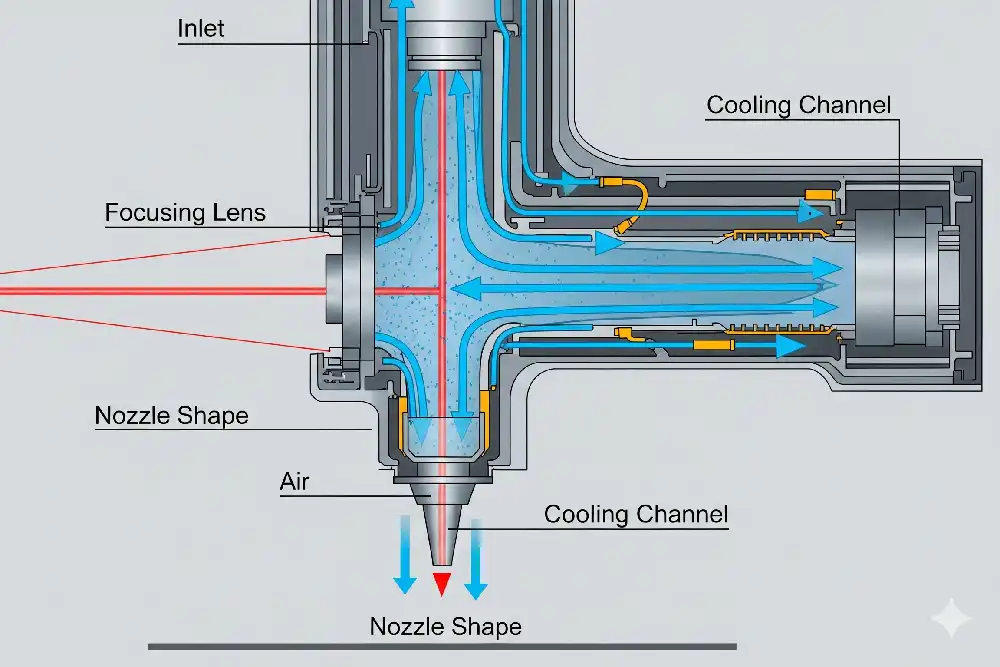
You control how debris leaves the surface by choosing the right nozzle shape. A narrow nozzle can focus the air or gas flow, which helps push away particles after the laser breaks them loose. A wider nozzle covers more area but may not remove debris as well from tight spots. The nozzle also affects how the laser beam spreads out. If you want even cleaning, you need to match the nozzle shape to the job. The right nozzle helps you keep the cleaning area clear, so the laser can keep working without blockages.
Lens setup and beam focus
You use the lens to focus the laser beam. The lens setup decides how small or large the beam spot will be. A short focal length gives you a smaller spot, which means higher energy in one place. This helps you clean thin layers or small spots with more precision. A longer focal length lets you clean thicker materials because it gives you a deeper focus. If you use a microscopic objective lens, you can remove tiny contaminants with great accuracy, but you lose some flexibility. If you do not set the focus right, you might see rough surfaces or leftover debris.
Tip: Always check your lens alignment before starting. A well-aligned lens gives you better cleaning results.
Cooling system impact
You need a cooling system to keep the laser head structure stable. The cooling system stops the laser from overheating. If the temperature stays steady, you get the same cleaning power every time. This means you avoid sudden drops in performance or damage to the machine. Good cooling also makes your equipment last longer and reduces how often you need repairs. Some systems use air, while others use water. Both help keep the laser and scanner safe and working well.
- Cooling systems protect your workspace by stopping fires and equipment failures.
- Advanced systems have sensors that shut down the laser if it gets too hot.
Movement and distance control
You must move the laser head smoothly and keep the right distance from the surface. If you move too fast, you might miss spots. If you move too slow, you could damage the surface. Keeping a steady distance helps you get even cleaning across the whole area. Some laser head structure designs use scanners or motors to control movement. These parts help you keep the beam focused and the cleaning effect uniform.
Note: Consistent movement and distance are key for high-quality cleaning, especially on large or uneven surfaces.
Laser head structure and cleaning performance
Energy delivery optimization
You can get better cleaning by changing how the laser gives energy. You should adjust laser power, pulse width, and speed for each material. The right laser head structure lets you change the beam shape and focus. This makes cleaning faster and easier. Smart control systems help by watching the process and changing settings as you work. These systems make cleaning better and save you time.
- Change laser settings for every job.
- Pick a cleaning head that fits your task.
- Use smart controls to keep cleaning the same.
When you take off oxide films or paint, set the energy carefully. If you use a pulsed laser, making the laser line wider first helps remove more. But if you go too wide, it removes less. The best removal is at a 50 mm linewidth. Here, you can take off about 3.7 mg of oxide. If the line is too wide, energy spreads out and cleaning gets worse. The right settings also stop remelting problems.
| Parameter | Effect on Oxide Removal |
|---|---|
| Pulsed Laser Linewidth | Removal first goes up, then down with linewidth. |
| Maximum Removal | Best at 50 mm linewidth with 3.7 mg oxide gone. |
| Laser Fluence | Goes down as linewidth gets bigger. |
| Remelting Phenomenon | Less remelting with wider lines, so cleaning is better. |
| Threshold Effect | Cleaning starts when vibration or vaporization happens. |
| Increased Linewidth | Less energy per spot, so less oxide is removed. |
How you give energy changes how well you clean layers. The laser head structure is very important for this.
Sweep speed and surface results
Sweep speed means how fast you move the laser. If you go too slow, you might burn or hurt the surface. If you go too fast, you might not clean everything. The overlap rate is how much the laser covers the same spot again. This also changes how well you clean. You need to find the best speed for each job.
| Cleaning Speed (m/min) | Overlap Rate (%) | Oxygen Content (%) |
|---|---|---|
| 1.8 | 69.7 | 8.48 |
| 4.5 | 24.2 | 6.44 |
If you clean slowly, the overlap rate gets higher. This means the laser hits each spot more than once. More oxygen can stay on the surface. If you clean faster, the overlap is lower and there is less oxygen left. You get a cleaner surface and less damage. The laser head structure should help the laser move smoothly and keep the speed steady.
Tip: Try different sweep speeds on a small spot first. This helps you pick the best speed for your material.
Uniformity across materials
You want your cleaning to look the same on all materials. The laser head structure helps by keeping the beam steady and the distance right. Pulsed lasers are good for small, delicate parts. Continuous lasers are better for big or rough jobs. Each type has good and bad points.
| Feature | Pulsed Lasers | Continuous Lasers |
|---|---|---|
| Power Output | Lower power (100W-500W) | Higher power (1000W-3000W+) |
| Beam Quality | Better beam, more control | Beam is less steady |
| Cleaning Precision | Very precise, less heat | Not as precise, more heat |
| Cleaning Speed | Slower, good for thin layers | Faster, good for tough jobs |
| Material Compatibility | Best for fragile parts | Best for rougher surfaces |
If you need to clean a big metal part, use a continuous laser. If you need to clean a thin film on a small part, use a pulsed laser. The right laser head structure lets you switch or adjust for each job.
Note: Always pick the right laser head structure for your job. This helps you get the best cleaning every time.
Optimizing laser head structure for applications

Choosing the right nozzle and lens
You should pick the nozzle and lens for your job. The right ones help you clean better and keep your tools safe. Some nozzles work best for certain materials. For example, a short nozzle with a big hole is good for cutting acrylic. It makes the edges smooth. A short nozzle with a small hole is better for wood. It blows air into the cut and takes away smoke. A long nozzle with a small hole can reach deeper places. This works well with a long lens. Copper nozzles are good for cutting thick wood or polycarbonate.
| Nozzle Type | Diameter | Application Description |
|---|---|---|
| Short nozzle with large hole | 7 mm | Good for acrylic, smooth flame-polished edges |
| Short nozzle with small hole | 3 mm | Best for wood, removes smoke |
| Long nozzle with small hole | 3 mm | Works with long lens, deeper focus |
| Copper nozzles for laser cutting | 1.7 mm | Cuts thick wood or polycarbonate, focused airflow |
Tip: Always check your lens and nozzle before you start. Clean parts help you get better results and less machine trouble.
Adjusting for material type
You need to think about what you are cleaning. Metals, plastics, glass, ceramics, and non-ferrous metals all act differently. Metals let you take off rust and coatings without hurting the main part. Plastics like ABS, PVC, and PET need gentle cleaning so they do not get damaged. Glass stays clear and strong after cleaning. Ceramics keep their shape and do not break. Non-ferrous metals like copper and aluminum clean well and do not rust.
| Material Type | Cleaning Characteristics | Effectiveness in Laser Cleaning |
|---|---|---|
| Metals | Removes rust, oxide, coatings; base stays safe | Highly effective |
| Plastics | Needs care to avoid damage | Good for molds and parts |
| Glass | Keeps quality and transparency | Ideal for restoration |
| Ceramics | No surface damage | Effective for cleaning |
| Non-Ferrous Metals | Avoids corrosion, cleans well | Recommended for copper, aluminum |
You should also choose the right laser type. Pulsed lasers are good for thin or delicate parts. Continuous lasers clean thick rust and paint faster. Sometimes, using both types gives the best results.
Enhancing stability and precision
You want your cleaning to be steady and exact. Good design helps you do this. A double wobble cleaning head moves the laser in two ways. This lets you clean more area and do it faster. A strong beam transmission system keeps the laser energy focused. This means you clean better. Easy control systems let you change settings quickly.
| Design Feature | Contribution to Stability and Precision |
|---|---|
| Double Wobble Cleaning Head | Cleans faster and more evenly |
| Beam Transmission System | Delivers laser energy with high accuracy |
| Control System | Lets you manage and fine-tune cleaning easily |
The laser can hit only the dirt or rust. The main part stays safe. This careful control means you get clean parts without damage.
Laser cleaning machines are very exact. You can take off rust and paint but keep the part strong. This helps you avoid repairs and keeps your tools working longer.
You can tell that the way you design the laser head affects cleaning. If you want better cleaning, you should try these ideas:
- Change laser power, pulse frequency, and wavelength for each job.
- Pick cleaning paths that fit the mold’s shape.
- Make special cleaning plans for different materials and pollution.
Always look at your laser head parts and make changes. New studies say digital detection and careful calibration can make cleaning more accurate and help with new cleaning needs.
FAQ
What does the nozzle shape do during laser cleaning?
You control how debris moves by picking the right nozzle shape. A narrow nozzle pushes particles away better. A wide nozzle covers more area. The nozzle helps you keep the cleaning spot clear for the laser.
How does lens setup affect cleaning results?
You use the lens to focus the laser beam. A short lens gives you a small, powerful spot for precise cleaning. A long lens lets you clean deeper layers. Always check your lens alignment before you start.
Why is cooling important for the laser head?
You need cooling to keep the laser head safe. Cooling stops overheating and keeps cleaning power steady. Good cooling helps your machine last longer and prevents sudden breakdowns.
Can you use the same laser head for all materials?
You should match the laser head to the material. Metals, plastics, and glass need different settings. Pulsed lasers work best for delicate parts. Continuous lasers clean tough surfaces faster.
How do you keep cleaning even across a surface?
You move the laser head smoothly and keep the same distance. Motors or scanners help you control movement. Consistent speed and distance give you a uniform cleaning effect.
See also
Essential Maintenance Tips for Laser Scanning Galvanometers
The Ultimate Guide to Parameter Requirements for Fiber Laser Cleaning
Exploring the Science Behind Ship Rust Removal Using Lasers
What must be checked before starting the laser cleaning machine