
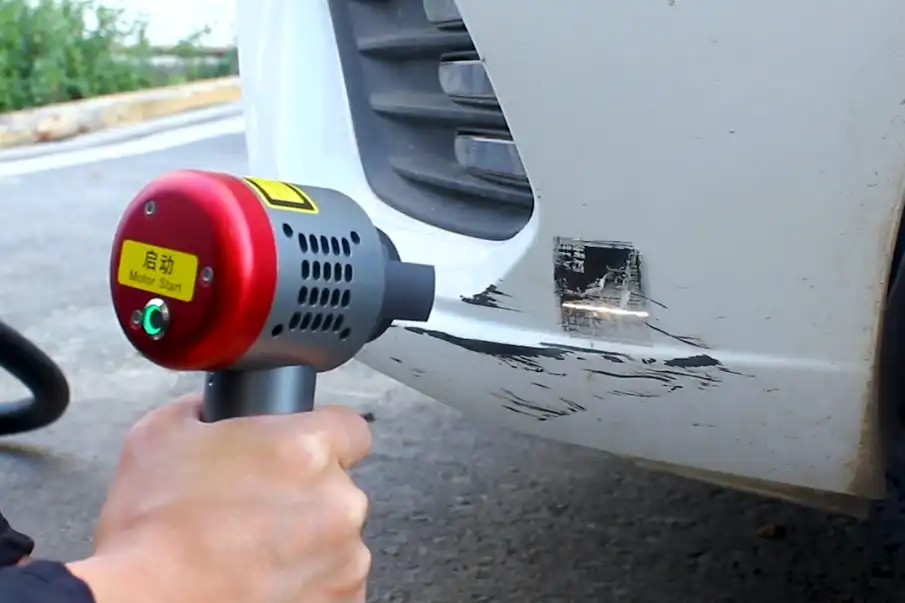
When operating a handheld laser cleaning machine, safety is the top priority. Always wear the appropriate personal protective equipment before you begin. This laser cleaning technology is not only gentle but also environmentally friendly. It effectively removes rust, paint, and grease from both metal and non-metal surfaces. These machines find applications in various industries, including cars, airplanes, ships, and food factories.
As more companies seek fast and eco-friendly cleaning solutions, the demand for handheld laser cleaning machines is on the rise.
| Application Area | Description |
|---|---|
| Metal Surfaces | Effectively removes rust, oxides, paint, glue, and grease. |
| Non-Metals | Cleans ceramics, plastics, wood, stone, and mixed materials. |
| Sensitive Contexts | Safely cleans food machines, nuclear parts, and battery components. |
| New Sectors | Eliminates germs and removes layers of bacteria. |
Key Takeaways
- Always wear the right personal protective equipment before you use the laser cleaning machine. This means you should put on safety goggles, flame-resistant clothes, gloves, and a mask if you need one.
- Make sure your workspace is safe. Keep it clean, bright, and let fresh air in. Use barriers to stop the laser beam from going out. Put warning signs at the doors.
- Follow all laser safety rules. Only people who are trained can go in the workspace. There should always be a Laser Safety Officer there.
- Check the machine before you use it. Look for any damage. Make sure the protective lens is clean. Set the laser to match the material you will clean.
- Take care of the machine often. Clean the optical parts. Check the cooling system. Change any parts that are worn out. This helps the machine work well.
Safety Precautions & PPE
Required Protective Equipment
You need to wear the right PPE before using a handheld laser cleaning machine. This gear helps protect you from burns and laser exposure. Here is a list of what you need:
- Wear safety goggles that block the laser’s wavelength, like 1080nm. The goggles should fit well and have the right optical density.
- Put on flame-resistant clothes that cover your arms and legs. These clothes keep your skin safe from heat and burns.
- Use gloves to protect your hands from heat and laser radiation. Pick gloves that you can take off quickly if needed.
- Wear a mask if the cleaning makes dust, fumes, or toxic particles.
- Use ear protection if the machine is loud.
| Type of PPE | Description |
|---|---|
| Laser Safety Glasses | Keep your eyes safe from strong laser beams. |
| Protective Clothing | Flame-resistant, covers skin to stop burns. |
| Gloves | Protect hands from heat and laser radiation. |
| Respiratory Guard | Needed if there are toxic gases or particles. |
| Hearing Protection | Keeps your ears safe from loud sounds. |
Tip: Check your PPE every time before you use it. Make sure nothing is broken or missing.
Safe Workspace Setup
A safe workspace helps keep you and the machine safe. Follow these steps to set up your area:
- Keep the room between 59°F and 86°F (15°C to 30°C).
- Humidity should be between 30% and 65%. This stops condensation and static.
- Clean the area and remove dust. Dust can block the laser and start fires.
- Use good lighting so you can see, but avoid glare.
- Make sure the room has good airflow to clear away fumes and particles.
- Put up barriers or curtains to keep the laser beam inside the work area.
- Place warning signs at every entrance. Signs should be easy to see and read.
Laser Safety Guidelines
You must follow laser safety rules when using a handheld laser cleaning machine. These rules keep everyone safe:
- Always wear laser safety glasses and protective clothes.
- Use barriers or curtains to stop the laser beam.
- Only trained people should go in the workspace. Use locks or checks to limit entry.
- Put ANSI-approved warning signs at all doors.
- Have a Laser Safety Officer (LSO) to watch for safety and give training.
- If there is an accident, turn off the laser, help anyone hurt, and call for help fast.
Note: Following these steps helps stop injuries and keeps your workspace safe.
Operating a Handheld Laser Cleaning Machine
Machine Setup Steps
You must follow a clear process when operating a handheld laser cleaning machine. Start by preparing yourself and your workspace. Here are the steps you should take:
- Put on all required personal protective equipment. This includes laser safety goggles, gloves, and protective clothing.
- Prepare your work area. Make sure the space is well-lit and ventilated. Remove any flammable materials. Set up barriers or curtains to keep the laser beam contained.
- Inspect the machine. Check for visible damage, loose wires, or problems with the cooling system.
- Adjust the laser settings. Use the manufacturer’s guidelines to set the right power and speed for your material.
- Align the laser head. Position it over the area you want to clean. Run a short test scan to see how the laser works on the surface.
- Begin cleaning. Move the laser evenly across the surface at a steady speed.
- Check your results. Look at the cleaned area to make sure all dirt or rust is gone.
- Finish by turning off the machine. Clean the laser head and store the equipment safely.
Tip: Always follow the manufacturer’s instructions for each step. This helps you avoid mistakes and keeps you safe.
Powering On & Initial Checks
Before you power on the machine, you need to check a few things. These checks help prevent accidents and keep the machine working well.
- Look at the protective lens. Make sure it has no cracks or dirt. Replace it if you see any damage.
- Check the red-light indicator. It should be on and centered. If it is missing or off-center, do not use the machine.
- Turn on the main power switch first. Only then should you use the rotary switch to start the laser. This order prevents sudden laser activation.
- Make sure no one else is in the workspace. Remove all flammable items.
Note: Skipping these checks can lead to machine damage or injury.
Adjusting Laser for Material & Surface
You need to set the laser correctly for each job. Different materials need different settings. Follow these steps to get the best results:
- Identify the material you want to clean. Learn about its heat resistance and how it reacts to lasers.
- Set the starting laser power and speed. Use the manufacturer’s chart or manual for guidance.
- Test the settings on a small area. Watch how the material reacts.
- Adjust the power and speed if needed. Change the focus or gas pressure for better results.
- Write down the best settings. Use them next time for the same material.
| Material Type | Suggested Power Range | Notes |
|---|---|---|
| Metal | 1500W – 3000W | Use higher power for thick rust or paint. |
| Wood | 100W – 300W | Use low power and short pulses to avoid burning. |
| Stone | 200W – 1000W | Start low and increase as needed. |
For sensitive surfaces, always start with low energy and short pulses. Watch the surface closely to avoid damage.
Cleaning Techniques & Proper Distance
When operating a handheld laser cleaning machine, your technique matters. Hold the laser at the right distance and move it in the correct pattern.
- Keep the laser nozzle 0.5 mm to 1.5 mm from the surface. This range gives you the best cleaning without harming the material.
- Move the laser in smooth, even strokes. Do not stay in one spot too long.
- Try different scan patterns for better results. For example, the “flower” pattern spreads the laser energy and avoids hot spots.
| Scan Pattern | Definition | Best Use |
|---|---|---|
| Flower | Petal-shaped, non-linear path | Even cleaning on sensitive surfaces like wood |
- For large areas, use higher power and a steady hand to cover more ground quickly.
- For delicate jobs, use lower power and move slowly.
Tip: Practice your movement on scrap material before starting on the real surface.
Operating a handheld laser cleaning machine becomes easier with practice. Always check your results and adjust your technique as needed. This approach helps you clean surfaces efficiently and safely.
Common Mistakes to Avoid
Improper Handling
If you do not use the handheld laser cleaning machine the right way, you can get hurt. You must pay attention and be careful every time you use it. Some people think they know enough and do not follow all the steps. This can cause accidents or break the parts you are cleaning. Masking means you cover places you do not want to clean. It takes time and care to do it right. If you hurry, you might make mistakes.
Here are some dangers if you do not handle the machine safely:
- Health risks: Breathing in bad fumes or dust can hurt your lungs.
- Electrical hazards: High power can shock you or start a fire.
- Fire hazards: Sparks or stray beams can burn things nearby.
- Mechanical hazards: Moving parts can grab your clothes or fingers.
- Chemical exposure: Bad chemicals can burn your skin or eyes.
- Ergonomic hazards: Doing the same motion can make your muscles sore.
- Thermal hazards: Hot parts can burn you.
- Noise hazards: Loud sounds can hurt your ears.
Always take your time and follow each step. Being careful keeps you safe.
Skipping Safety Steps
If you skip safety steps, you can get very sick or hurt. You need to use the right filters and fans to keep the air clean. Laser cleaning can put tiny bits of carbon, germs, and even DNA in the air. Some of these things can make you sick for a long time.
- You could breathe in things that change your body or spread disease.
- Bad gases and dust can get into your lungs.
- More than 41 dangerous gases can come out during cleaning.
Do not skip any safety steps, even if you think you know what you are doing. Every step helps keep you safe from things you cannot see.
Incorrect Laser Settings
If you set the laser wrong, you can mess up your work or break the machine. You have to pick the right power, focus, and speed for what you are cleaning. If you use the wrong settings, you might burn the edges or make the surface rough.
Some common mistakes are:
- Using power between 500 and 1,000 watts when you need more or less.
- Picking the wrong focus distance, like .010 to .014 inches, which can make the cleaning uneven.
- Moving too fast or too slow, like 40 to 100 inches per minute, which does not work for every job.
Other mistakes you should not make:
- Too much current can make the laser tube too hot.
- Wrong focus makes the laser weak.
- Not cleaning the machine lets dust build up and cause problems.
- Picking the wrong gas or speed can leave marks or dirt.
Always check your settings before you start. Even a small mistake can cause big trouble.
Efficient Cleaning Tips & Maintenance
Optimizing Speed & Coverage
You can clean faster and better by using smart methods. Change the laser’s pulse time and how often it fires to control heat. Use compressed air or take short breaks to stop the machine from getting too hot. If you clean things that get hot easily, use low-power cleaning.
- Clean small spots first for quick and easy results. This gives you more control and saves time.
- For big areas, slow down and watch out for tough dirt.
- Match the laser’s power with how fast you move it. High power cleans thick layers fast, but be careful not to hurt the surface.
Tip: Try cleaning on scrap pieces before working on the real thing. This helps you pick the best speed and area to clean.
Routine Machine Care
Taking care of your machine every day and month keeps it working well. Each day, look for damage, dirt, or worn parts. Clean the lens with the right tools. Check cables for damage and test if the power is steady.
- Once a month, check the cooling system and fix the laser’s aim. Watch how the machine works and adjust if needed.
- Work in a clean place with no dust. Keep the room at the right temperature and humidity. Make sure there is good airflow.
- Clean the optical parts often so the machine works well.
- Check the system often to find problems early.
- Change parts that wear out before they break.
- Update the control system to help the machine run better.
Good care stops the machine from breaking and saves you money.
Troubleshooting Basics
Sometimes, your handheld laser cleaning machine may have problems. Use this table to find what is wrong and how to fix it:
| Issue | Solution |
|---|---|
| Optics | Clean or change dirty or cracked optics. Watch for heat problems. |
| Protection Window | Clean after each use. Change if it is broken. |
| Fiber Care | Look for damage. Tighten all connections. Make sure cooling works. |
| Chiller System | Check every six months. Change coolant and filters. |
| Filter | Change every three months. Clean the filter holder every six months. |
Learning more helps you fix problems faster. You can read manuals, blog posts, or watch videos to learn.
- Look at product manuals, videos, and guides to learn new things.
- Groups like OSHA and IEC give safety tips and training.
If you keep learning and follow good habits, you will clean better and your machine will last longer.
You can use a handheld laser cleaning machine safely by following important safety steps. Always put on your laser safety glasses before you start. Set up your workspace with barriers and warning signs. Check the machine every time before you use it. Make sure the area is clean and has good airflow. Training teaches you what to do in emergencies and how to take care of your machine. Use this checklist to help you remember what to do:
| Safety Measure | Description | Examples/Equipment |
|---|---|---|
| Operator Training | Learn how to use and care for the machine | Manuals, certified programs |
| Laser Safety Glasses | Protect your eyes from laser beams | Glasses for specific wavelengths |
| Safe Work Area | Prevent accidental exposure | Barriers, safety signs |
| Ventilation and Exhaust | Remove fumes and particles | Exhaust fans, air filters |
| Emergency Stop Mechanism | Stop the machine quickly if needed | Emergency button, auto shut-off |
Keep learning and practicing your skills. Training and regular care help you stay safe and do a good job.
FAQ
What should you do if the laser cleaning machine does not turn on?
First, check the power cable and plug. Make sure the emergency stop button is not pressed. Inspect the main switch. If the machine still does not start, contact a technician for help.
Can you use a handheld laser cleaning machine on painted surfaces?
Yes, you can use it to remove paint. Always test on a small area first. Adjust the laser power to avoid damaging the base material. Wear your protective gear during the process.
How often should you clean the laser lens?
You should clean the lens after every use. Use a soft, lint-free cloth. Avoid touching the lens with your fingers. Keeping the lens clean helps the machine work better and last longer.
What do you do if you see smoke or sparks during cleaning?
Stop the machine right away. Check for flammable materials nearby. Make sure you use the correct laser settings. If the problem continues, ask a safety officer or technician for advice.
Do you need special training to operate a handheld laser cleaning machine?
Yes, you need training before you use the machine. Training teaches you how to use the controls, set up the workspace, and follow safety rules. Ask your supervisor or the manufacturer for training options.
See also
What You Need to Know About Laser Cleaning Machine Certification
What Is the Range of Laser Cutting Thickness for Common Materials



