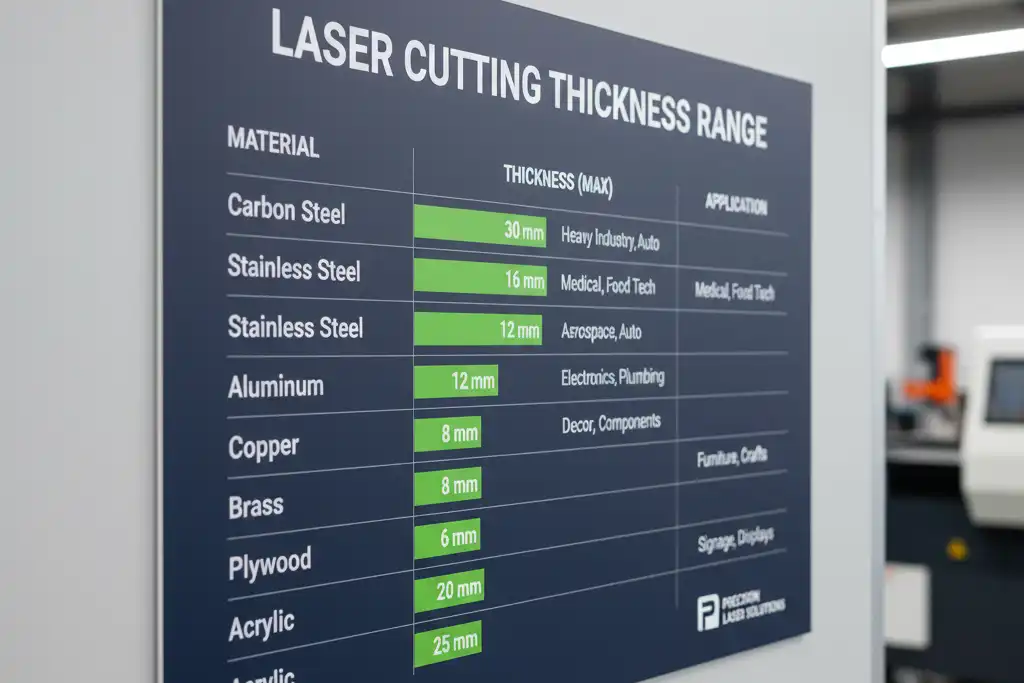
You can use lasers to cut many materials, and the thickness of laser cutting you can achieve depends on the material and the laser type. Look at the table below to see common thickness ranges:
| Laser Type | Maximum Thickness | Minimum Thickness |
|---|---|---|
| CO2 Lasers | Up to 20 mm | Thin as 1 mm |
| Nd:YAG Lasers | Up to 10 mm | Thin as 1 mm |
| Fiber Lasers | Up to 20 mm | Thin as 0.5 mm |
Laser power is very important when considering the thickness of laser cutting. More power allows you to cut thicker pieces, but too much power can damage the material. You need to control the settings carefully. For example, you can cut 10 mm carbon fiber reinforced composites with a strong fiber laser, but you must set the laser precisely to avoid any damage.
Key Takeaways
- Laser cutting thickness changes with the material and laser type. CO2 and fiber lasers can cut up to 20 mm thick. Nd:YAG lasers can cut up to 10 mm thick.
- More laser power lets you cut thicker materials. For example, a 40 kW fiber laser can cut steel up to 50 mm thick.
- Each material needs special laser settings. Always check the material’s properties before you pick a laser and power.
- Plastics like acrylic are easier to cut than metals. Acrylic can be cut up to 30 mm thick if you use enough laser power.
- Reflectivity changes how well the laser cuts. Shiny materials like aluminum need more power because they reflect light.
- Always test your laser settings on a small piece first. This helps you get the best edge and thickness.
- Safety is very important when using a laser cutter. Wear protective gear and make sure the room has good airflow to avoid bad fumes.
- If laser cutting does not work well, try water jet cutting or CNC routing for better results.
Thickness of Laser Cutting by Material
You need to know the thickness of laser cutting for each material before you start your project. The type of laser and the material both decide how thick you can cut. Here is a clear breakdown for metals, plastics, and composites.
Metals
Steel
You can cut steel with different lasers and power levels. The thickness of laser cutting for steel changes with the power you use. Look at this table to see what is possible:
| Laser Power | Steel Thickness Range |
|---|---|
| 1.5 kW | Up to 6 mm |
| 3 kW | Up to 16 mm |
| 6 kW | Up to 25 mm |
| 12 kW | Up to 35 mm |
| 40 kW | Up to 50 mm |
Tip: If you use a fiber laser with high power, you can cut steel up to 50 mm thick. Lower power lasers work best for thinner sheets.
You can also see how the thickness of laser cutting increases with more power in this chart:
Stainless Steel
Stainless steel is common in many industries. You can cut it from 0.5 mm up to 20 mm thick. You need a laser with power between 1000W and 6000W for most jobs. Fiber and CO₂ lasers both work well for stainless steel.
Aluminum
Aluminum reflects more light, so you need a strong laser. The thickness of laser cutting for aluminum usually ranges from 0.5 mm to 15 mm. You should use a laser with 1000W to 4000W power. Fiber lasers cut aluminum faster and with better quality than CO₂ lasers.
Note: For all metals, the right laser type and power help you get clean cuts and avoid damage.
Plastics
Acrylic
Acrylic is easy to cut with a laser. The thickness of laser cutting for acrylic ranges from 1 mm to 30 mm. Most standard lasers can cut up to 6 mm thick, but high-power lasers can handle thicker sheets. Here is a quick table:
| Acrylic Thickness | Laser Power Needed |
|---|---|
| Up to 6 mm | 40W |
| Up to 30 mm | 180W (at 75% power) |
Polycarbonate
Polycarbonate is tougher than acrylic. You can cut polycarbonate sheets that are 3.0 mm, 4.5 mm, or 5.6 mm thick. Thicker sheets may melt or burn, so you need to use the right settings.
Tip: Always check the manufacturer’s guidelines for plastics. Some plastics release fumes when cut.
Composites
Carbon Fiber
You can cut thin carbon fiber sheets with a laser. The thickness of laser cutting for carbon fiber depends on the laser power:
- A 45W blue laser can cut up to 0.5 mm thick.
- For 2 mm to 5 mm sheets, you need a high-power blue laser or CNC router.
- For aerospace-grade carbon fiber over 5 mm, only high-power lasers can cut cleanly.
Wood-Based
Wood-based composites, like plywood or MDF, are popular for laser cutting. You can cut up to 20 mm thick with a 45W laser. For detailed engraving, a 6W laser can cut up to 3 mm thick.
Note: The thickness of laser cutting for composites depends on the fiber direction and how the material absorbs heat.
Summary Table: Thickness of Laser Cutting by Material
| Material | Typical Thickness Range | Laser Power Needed |
|---|---|---|
| Steel | 0.5 mm – 50 mm | 1.5 kW – 40 kW |
| Stainless Steel | 0.5 mm – 20 mm | 1 kW – 6 kW |
| Aluminum | 0.5 mm – 15 mm | 1 kW – 4 kW |
| Acrylic | 1 mm – 30 mm | 40W – 180W |
| Polycarbonate | 3 mm – 5.6 mm | 40W+ |
| Carbon Fiber | 0.5 mm – 5 mm+ | 45W+ |
| Wood-Based | Up to 20 mm | 6W – 45W |
You can see that the thickness of laser cutting changes a lot based on the material and the laser you use. Always match your laser to your material for the best results.
Factors Affecting Cutting Thickness
Many things decide how thick a laser can cut. You must think about the material, the laser’s type and power, and how fast you cut. Each thing changes your final result.
Material Properties
Density
Density means how much stuff is packed in a material. If a material is dense, you need more energy to cut it. Steel is dense, so you need a strong laser. Plastics are not dense, so you need less power.
Reflectivity
Reflectivity shows how much light bounces off a material. Aluminum reflects a lot of laser light. You need more power to cut it because less energy goes into the cut. Acrylic does not reflect much, so it absorbs more laser energy and is easier to cut.
Thermal Conductivity
Thermal conductivity tells how fast heat moves through a material. If heat moves away fast, it is harder to cut thick pieces. If heat stays in the cutting area, the laser can cut deeper.
Here is a table that shows how these properties change the thickness of laser cutting:
| Material Property | Impact on Laser Cutting Thickness |
|---|---|
| Density | Changes how much heat and energy you need to cut. |
| Reflectivity | Changes how much laser energy is absorbed; shiny materials need more power. |
| Thermal Conductivity | Changes how heat moves; low conductivity helps cut deeper. |
Tip: Always check the material’s properties before you start. This helps you pick the right laser and settings.
Laser Power & Type
CO2 Lasers
CO2 lasers are good for cutting non-metals and some metals. They can cut up to 20 mm thick in many materials. They work best with plastics and wood.
Fiber Lasers
Fiber lasers are better for metals. They can cut steel up to 50 mm thick if you use enough power. Fiber lasers also cut faster and make cleaner edges on shiny metals.
Nd:YAG Lasers
Nd:YAG lasers cut both metals and non-metals. They usually cut up to 10 mm thick. You might use them for small details or when you need a thin beam.
Note: The right laser type and power help you cut the thickest pieces for your material.
Cutting Speed & Quality
Speed vs. Thickness
Cutting speed changes how thick and smooth your cut is. If you cut too fast, you may not get through thick pieces. Slower speeds help you cut thicker pieces but can make the area around the cut hotter.
| Material Thickness | Edge Quality | Cutting Speed Adjustment |
|---|---|---|
| Thicker materials | Needs careful adjustment | Slower speeds preferred |
| Thinner materials | Cleaner edge, sensitive to changes | Faster speeds possible |
- Cutting speed changes how smooth and exact the cut is.
- Slower speeds are better for thick pieces.
- Thin pieces can have cleaner edges but change fast with speed.
Edge Quality
Edge quality depends on speed and material. If you want smooth edges, you must balance speed and power. Try your settings on a small piece first to find what works best.
Tip: Always test your settings on a small piece before you start your main project. This helps you get the best edge quality and the right thickness of laser cutting.
Thickness Comparison Table
You need to know the maximum thickness you can cut with a laser for each material. This table helps you compare metals, plastics, and composites side by side. You can use it to plan your project and choose the right laser.
Metals
Metals have different cutting limits based on the type of laser you use. Fiber lasers usually cut thicker metal than CO₂ lasers. Here is a table that shows the maximum thickness for common metals:
| Metal | CO₂ Laser Max Thickness (mm) | Fiber Laser Max Thickness (mm) |
|---|---|---|
| Carbon Steel | 25 | 30 |
| Stainless Steel | 20 | 25 |
| Aluminum | 15 | 20 |
Tip: You get the best results when you match the laser type and power to the metal you want to cut.
You can see that fiber lasers let you cut thicker steel and aluminum. Stainless steel also cuts well with both types, but fiber lasers give you a little more range.
Plastics
Plastics are easier to cut than metals. You do not need as much power. The table below shows the typical maximum thickness for popular plastics:
| Plastic | Max Thickness (mm) | Common Laser Type |
|---|---|---|
| Acrylic | 30 | CO₂ |
| Polycarbonate | 5.6 | CO₂ |
| Plastics/Wood | 20–25 | CO₂ |
Acrylic lets you cut the thickest sheets. Polycarbonate has a lower limit because it can melt or burn if you use too much power. Most plastics and wood-based materials work well up to 20–25 mm.
Note: Always check the material’s safety data. Some plastics release fumes when you cut them.
Composites
Composites include materials like carbon fiber and wood-based boards. You can use lasers to cut these, but the thickness depends on the type and quality of the composite.
| Composite Material | Max Thickness (mm) | Recommended Laser Type |
|---|---|---|
| Carbon Fiber | 5 | Fiber/Blue |
| Wood-Based (MDF, Plywood) | 20–25 | CO₂ |
You can cut thin carbon fiber sheets with a laser. For wood-based composites, you can cut up to 25 mm with a strong CO₂ laser.
- Carbon fiber needs careful settings to avoid burning.
- Wood-based boards cut cleanly and are popular for crafts.
If you want to cut thicker composites, you may need to use a different method or a more powerful laser.
This comparison table gives you a clear view of what thickness you can expect for each material. You can use it to decide what laser and material fit your project best.
Best Lasers for Materials
Metals
When you want to cut metals, you need to choose the right laser for the job. Fiber lasers work best for most metals. You can use them to cut stainless steel, carbon steel, aluminum, and copper. Fiber lasers give you higher cutting speeds and better productivity than other types. They also use less power, which helps you save energy.
Fiber lasers can cut faster and last longer compared to CO₂ and diode lasers. They are renowned for offering higher cutting speeds and productivity, which contributes to lower power consumption.
If you need to cut thick steel plates, you should use a high-power fiber laser. The thicker the metal, the more power you need. For example, a 1500W fiber laser can cut thin sheets, while a 6000W or even 12000W machine can handle much thicker plates. You get clean, precise cuts with the right power level.
- Fiber lasers are optimized for metals like:
- Stainless steel
- Carbon steel
- Aluminum
- Copper
CO₂ lasers are not as effective for metals. You might use them for thin metal sheets, but they work better with non-metallic materials.
Plastics
You can cut many plastics with a CO₂ laser. This type of laser gives you smooth edges and works well for materials like acrylic and polycarbonate. Most plastics cut best in the 0.5 mm to 10 mm thickness range.
| Material Type | Recommended Thickness Range |
|---|---|
| Plastics | 0.5mm to 10mm |
CO₂ lasers let you cut detailed shapes and letters in plastic. You can use them for signs, displays, and models. Fiber lasers are not usually used for plastics because they do not absorb the laser energy as well.
Tip: Always check the safety data for your plastic. Some plastics release fumes when you cut them.
Composites
You can use lasers to cut some composites, but you need to match the laser to the material. For carbon fiber sheets, a fiber laser or a high-power blue laser works best. You can cut thin sheets cleanly, but thick or layered composites may need special tools.
- Cork is suitable for laser cutting.
- ACM (Aluminum Composite Material) uses CNC routers.
- Some composites may need waterjet cutting.
When you choose a laser for composites, think about how the material was made. Some composites, like wood-based boards, cut well with a CO₂ laser. Others, like ACM, need a different method.
Note: Always test a small piece first. Composites can react differently to laser heat.
You can get the best results by matching your laser to the material and thickness. This helps you cut cleanly and safely every time.
Laser Cutting Tips
Project Planning
When you start a laser cutting project, you need to think about a few key things. These steps help you get good results and stop problems before they happen.
- Project Requirements: Decide what your project should do. Think about how strong it needs to be. Think about if it should bend or stay stiff. Think about how you want it to look and feel when finished.
- Laser Compatibility: Make sure your material works with your laser cutter. Always check the manufacturer’s rules before you start.
- Budget: Plan how much money you will spend on materials. Remember to include any extra work you might need after cutting.
- Safety: Make sure your room has good airflow. Always follow all safety rules.
- Post-Processing: Some materials need more work after cutting. Plan time for this step.
You should also look out for changes in thickness. Metals can have small thickness changes that affect how deep the laser cuts. Plastics like acrylic can bend when they get hot, which can change their shape. Wood materials, like plywood or MDF, can have natural differences that make cuts uneven.
Tip: Leave a little extra space in your designs for tight fits. This helps if the material thickness changes during cutting.
Material Selection
Picking the right material changes how thick you can cut and how nice the cut looks. You need to know what makes a material good for laser cutting.
- Material Composition and Purity: Pure, high-quality materials give you cleaner cuts and better results.
- Material Thickness and Density: Thicker or heavier materials need more laser power. This changes how fast and how well you can cut.
- Thermal Conductivity: Materials that do not move heat fast are easier to cut with care.
- Surface Reflectivity: Shiny materials can bounce the laser beam. This can make cuts less even.
Always match your material to your laser’s abilities. This helps you get the best edge and waste less material.
Safety
Laser cutting can be risky if you do not follow safety rules. You need to keep yourself and your workspace safe. Here is a table that shows what you need for safe laser cutting:
| Safety Aspect | Details |
|---|---|
| Personal Protective Equipment (PPE) | Wear eye protection made for your laser’s wavelength, heat-resistant gloves, and non-flammable clothing. |
| Workspace Safety Requirements | Use good ventilation (at least 1000 CFM), have fire safety tools, and make sure you can reach emergency stops. |
| Machine Safety Features | Use safety interlocks, beam enclosures, and emergency shutoffs. |
| Maintenance Schedule | Check and clean your machine often to keep it safe. |
| Emergency Response Protocol | Know what to do if there is a fire or injury. |
Note: Always follow the safety instructions for your laser cutter and material. This keeps you and your workspace safe.
Limitations & Alternatives
Unsuitable Materials
Laser cutting works for many things, but not all. Some materials do not work well with lasers. You should know which ones before you start. These materials can cause problems like bad edges, smoke, or melting.
- ABS: This plastic is tough, but it melts and burns with a laser. You might see rough edges and cuts that are not even. It can also make bad-smelling smoke.
- Epoxy: Cutting epoxy with a laser makes dangerous gases. These fumes are bad for your health. The edges may look burned or rough.
- Polypropylene: This material melts and sticks together when cut. Laser cutting is hard to do well. Even with special settings, the results are not always good.
Tip: Always read the safety info for your material. Some plastics and composites can make harmful smoke or catch fire.
There are other things that do not work with lasers. For example, PVC makes toxic smoke, and thick metals may not cut well. If you see burning, melting, or rough edges, try a different way to cut.
Alternative Methods
If your material is too thick or not good for lasers, you have other choices. These ways help you cut cleanly without melting or bad smoke.
- Water Jet Cutting: This uses strong water mixed with sand. You can cut metal, stone, glass, and composites. Water jets do not make heat, so there is no heat damage. You get smooth edges, even on thick things.
- Mechanical Cutting: Saws, routers, and shears work for wood, metal, and plastic. These tools are good for thick sheets or things that melt easily.
- CNC Routing: Computer-controlled routers cut shapes in wood, plastic, and composites. You get smooth and exact cuts.
- Plasma Cutting: This is for thick metals. Plasma cutters use electric arcs and gas to cut steel and aluminum.
Note: Water jet cutting is great for marble, concrete, and thick composites. You do not have to worry about heat or rough edges.
Pick the cutting method that fits your material and project. If you need to cut thick stone or metal, water jet cutting is best. For wood or plastic, tools like saws may be better. Always think about safety, edge quality, and cost before you choose.
Laser cutting is not always the best way. Knowing what does not work and what else you can use helps you plan and avoid problems.
You can use lasers to cut many materials. The thickness you can cut ranges from less than 1 mm to 50 mm. You must pick the right laser power for each material. Thin materials, less than 2 mm, need low-power lasers. If the material is 2 to 10 mm thick, you need a laser with 1 to 3 kW power. For thick metals over 10 mm, use a laser with 4 kW or more.
When you plan your project, think about a few things. Laser power and how fast you cut change the edge quality. The type and thickness of the material need special settings. Cooling is important to keep your machine working well.
You can make better choices if you know how the material and laser work together:
| Material | Hardness Change | Surface Roughness Impact | Kerf Width Impact | Laser-Affected Area Impact |
|---|---|---|---|---|
| Mild Steel (HA350) | -20.5% | Significant | Affected | Defects observed |
| Stainless Steel (SS316) | -22.7% | Significant | Affected | Defects observed |
| Aluminium (Al5005) | +46% | Improved | Affected | Defects observed |
If you have a special project or need to cut a certain thickness, ask a professional for help. Always choose your settings based on your material and laser to get safe and clean cuts.
FAQ
What materials can you cut with a laser?
Lasers can cut metals, plastics, and composites. Some common materials are steel, stainless steel, aluminum, acrylic, polycarbonate, carbon fiber, and wood-based boards.
What is the thickest steel you can cut with a laser?
A high-power fiber laser can cut steel up to 50 mm thick. Lasers with less power only cut thinner sheets.
What laser type works best for plastics?
CO₂ lasers work best for plastics like acrylic and polycarbonate. These lasers make smooth edges and clean cuts.
What safety gear should you use during laser cutting?
Wear eye protection, heat-resistant gloves, and clothes that do not burn. Good airflow helps keep your workspace safe.
What happens if you try to cut unsuitable materials?
You might see rough edges, melting, or bad fumes. ABS, epoxy, and PVC do not work well with lasers.
What factors affect the maximum cutting thickness?
Laser power, material type, density, reflectivity, and thermal conductivity all change how thick you can cut.
What alternatives exist if laser cutting does not work?
You can use water jet cutting, mechanical tools, CNC routers, or plasma cutters for materials lasers cannot cut.
What edge quality can you expect from laser cutting?
You get smooth and exact edges if you match the laser type and power to your material. Testing helps you find the best settings.
See also
How Laser Cleaning Outperforms Traditional Cleaning Methods
Laser Cleaning and Sandblasting Which Method Works Best