
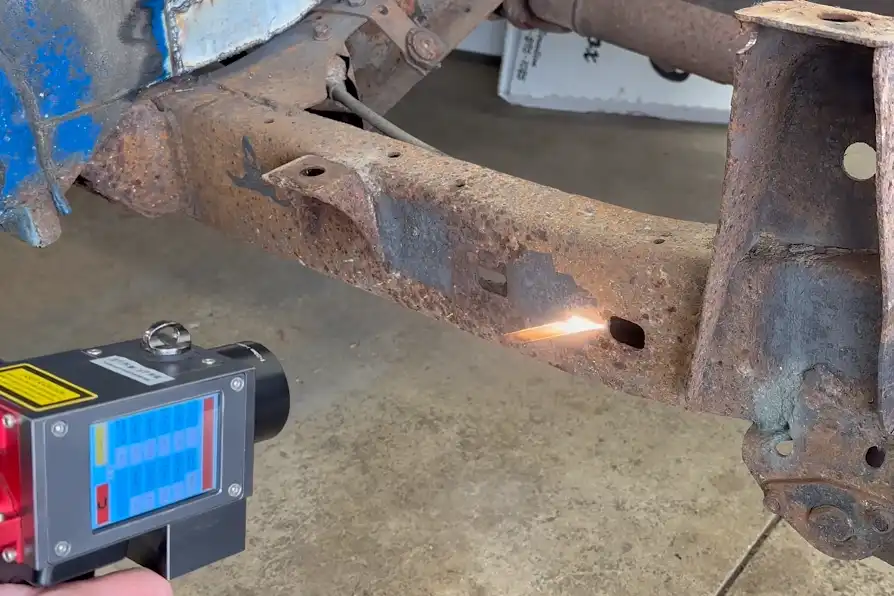
You should pick the right power level of laser cleaning for your job to achieve good results. Different lasers are better suited for different tasks. Low-power lasers (50–200 watts) are ideal for gentle cleaning, helping to restore old buildings. Medium-power lasers can effectively remove rust or paint. High-power lasers (1000–2000 watts) are utilized for tough jobs in large industries like aerospace. Refer to the table below to see common uses:
| Power Range | Average Power (Watts) | Applications |
|---|---|---|
| High-Power | 1000 – 2000 | Industrial mould cleaning, paint removal, rust removal, aerospace |
| Medium-Power | 200, 300 | Mould cleaning, rust and paint removal, welding preparation |
| Low-Power | 50 – 200 | Targeted paint removal, historic building restoration |
Always consider the material you are cleaning. Reflect on what you want to clean off and your cleaning goals. Selecting the appropriate power level of laser cleaning helps ensure your project is safe and effective.
Key Takeaways
- Pick the right laser power for the material and contaminant. This makes sure cleaning works well and does not cause harm.
- Use low power for gentle surfaces and high power for hard jobs. This keeps things safe and helps you work better.
- Always try your laser on a small spot first. This stops damage and lets you change the power if needed.
- Follow safety rules when using strong lasers. Wear safety gear and make sure everyone is trained.
- Write down your cleaning results in a log. This helps you find problems early and make your cleaning better over time.
Power Level of Laser Cleaning Explained
What Is Laser Cleaning Power?
When you look at laser cleaning, you will see two main types of lasers: pulsed and continuous wave. Each type has its own power output range. Pulsed lasers work in short bursts and usually have power outputs between 100W and 1,000W. Continuous wave lasers run without stopping and often reach 2,000W to 3,000W or even higher. Here is a simple table to help you compare:
| Laser Type | Power Output Range |
|---|---|
| Pulsed Laser | 100W to 1,000W |
| Continuous Wave | 2,000W to 3,000W or more |
The power level of laser cleaning tells you how strong the laser is. This strength affects how fast and how deep you can clean a surface. You need to choose the right type and power for your job.
Why Power Level Matters
The power level of laser cleaning changes how quickly you can finish a job and how well you remove dirt or rust. If you use a 100W laser, you can clean about 20-30 square centimeters each second. A 200W laser can clean twice as fast. When you use a 500W laser, you can clean over 100 square centimeters per second. For light jobs like removing paint, a 20-100W laser works well and keeps delicate surfaces safe. If you need to remove heavy rust or clean concrete, you should use a laser with more than 500W.
Safety is very important when you use high-power lasers. Lasers above 500 milliwatts fall into Class 4, which can cause serious eye and skin injuries. You must follow strict safety rules. Always assign a Laser Safety Officer, set up a controlled area, train everyone who uses the laser, and provide special eyewear. Regular safety checks and medical checks for operators help keep everyone safe.
Tip: Always match the power level of laser cleaning to your material and job size. This helps you clean faster and safer.
Choosing the Right Power Level
Material Type Considerations
First, look at what material you want to clean. Different materials need different laser settings. Metals often need more power. This is true for shiny metals like copper or brass. Non-metals, like plastics or composites, need less power. They soak up the laser energy more easily. Shiny materials can be hard to clean. You might need a fiber laser or a very strong laser to clean them well.
Here is a table to help you match material types with the right power level:
| Material Type | Power Level Considerations |
|---|---|
| Metals | Require higher power levels, especially reflective metals like copper or brass. |
| Non-metals | Absorb CO2 laser wavelengths well and can often be processed with lower power. |
| Highly Reflective Materials | Need extremely high power density or fiber lasers for effective cleaning. |
You should also think about the type of laser and its power. A continuous laser at 2000W works well for metals. It uses water cooling. A pulsed laser at 300W is better for gentle jobs. It uses air cooling.
| Laser Type | Laser Power | Operating Mode | Cooling Method |
|---|---|---|---|
| Continuous Laser | 2000 W | Continuous Wave (CW) | Water-cooled |
| Pulsed Laser | 300 W | Pulsed | Air-cooled |
Contaminant Type and Thickness
The kind and thickness of what you want to clean off matter too. Thin paint or light rust need less power. Thick paint, sticky rust, or heavy grease need more power and more time. If you use low power on thick layers, it will take a long time. You might not get good results.
| Contaminant Type | Power Range (W) |
|---|---|
| Rust Removal | 1000W to 2000W |
| Paint Removal | 200W to 1500W |
| Sticky Rust or Surface Prep | 500W to 1000W |
| Contaminant Thickness | Cleaning Efficiency (m²/h) |
|---|---|
| Thin Paint Layers | Up to 15 |
| Thick Paint Layers | Less than 1 |
- Heavy rust and grease need more power and more time to clean well.
Always match the power level of laser cleaning to what you are cleaning. This helps you work faster and keeps the surface safe.
Cleaning Speed and Safety
The power level of laser cleaning changes how fast you can finish. More power means you clean faster, especially on big areas. A 500W laser can clean 2 to 3 square meters each hour. A 1500W laser can clean 6 to 8 square meters each hour. In one study, a 2000W portable laser cleaned graffiti from concrete 60% faster than an 800W model.
| Power Level (W) | Cleaning Speed (m²/hour) |
|---|---|
| 500 | 2 to 3 |
| 1500 | 6 to 8 |
Tip: If you want to clean big areas fast, pick a higher power level. Always check the surface while you clean so you do not damage it.
Safety is very important with high-power lasers. You must wear safety goggles, gloves, and special clothes. Learn the warning signs and use laser barriers. Keep your work area clean and bright. Remove things that can catch fire and have fire safety tools ready. Only trained people should use high-power lasers. Always check the equipment before you start. Know how to turn it off fast if there is an emergency.
Safety Checklist for High-Power Laser Cleaning:
- Use laser safety enclosures to keep people safe.
- Wear laser safety glasses and control who can enter the area.
- Use air filters to catch dust and fumes.
- Remove things that can burn and check fire safety tools.
- Check wires and grounding to stop electrical problems.
- Train everyone and check their certificates.
- Look over the laser system before each use.
- Watch the cleaning and change settings if needed.
- Know how to shut down the laser in an emergency.
Picking the right power level of laser cleaning helps you work safely and get good results. Always think about the material, what you want to clean off, and your goals before you start.
Common Mistakes in Power Selection
Picking the right laser cleaning power level is not always easy. Many people make mistakes and do not get good results. Sometimes, these mistakes can even cause damage. You can stop these problems if you know the most common errors.
| Mistake | Description |
|---|---|
| Comparing pulse vs. continuous power | They do different jobs. |
| Overestimating high power | Too much continuous power can hurt surfaces. High-power pulsed lasers cost a lot. |
| Ignoring spot size adjustment | Small spots make the power stronger in one place. This changes how well you clean. |
| Neglecting safety | High-power lasers need good safety steps for radiation and fumes. |
Overpowering Risks
Using too much power can cause big problems. Here are some dangers you should know about:
- Toxic Fumes: Bad gases like carbon monoxide and ozone can get in the air. Breathing these gases can hurt your lungs.
- Particulate Matter: Tiny dust or metal bits can float around. Breathing them can make it hard to breathe.
- Surface Damage: High-power lasers can melt, bend, or crack the surface you want to clean.
Note: Always use the lowest power that works. This keeps you and your work safe.
Underpowering Issues
If your laser is too weak, it will not clean well. The laser may leave dirt or rust behind. You might have to clean the same spot many times. Leftover dirt can cause problems later, like when you want to paint or glue. Sometimes, wrong settings can make the surface too hot or rough. This can mess up your work.
Ignoring Material Differences
Every material acts differently when you clean it with a laser. If you forget this, you might hurt the surface or waste time. Metals, plastics, and composites all need different power levels. Shiny metals can bounce the laser away, so you need more power or a special laser. Soft materials can burn or melt if you use too much power. Always check what you are cleaning before you start.
🛑 Tip: Take time to match your laser settings to the material. This helps you get the best results and keeps your project safe.
Testing and Adjusting Power Levels
Safe Testing Methods
You should always test your laser cleaning settings before a big job. Start with the lowest power setting you can use. This helps protect new or sensitive materials from harm. Use pulsed-wave settings to control heat better. Move the laser slowly at first to stop burning the surface. Make sure you have training on the laser system you use. Good training helps you use the laser safely and get better results.
| Procedure | Description |
|---|---|
| Lower power settings | Use lower power to minimize risk of damage to new materials. |
| Pulsed-wave configurations | Helps in better heat control during cleaning. |
| Slower scanning speeds | Prevents overburn of the material being cleaned. |
| Training on fiber laser systems | Essential for precise control and safe operation. |
Tip: Always test on a small, hidden spot first. This lets you see how the material reacts.
Monitoring Results
You need to watch for signs that show if your cleaning is working. Check how fast the laser removes dirt or rust. Watch how much energy the laser uses while cleaning. See if the laser can handle different cleaning jobs. If you see slow cleaning or high energy use, you may need to change your settings.
| Indicator | Description |
|---|---|
| Removal Rates | The speed at which contaminants are removed. |
| Energy Consumption | The amount of energy used during the cleaning process. |
| Operational Versatility | The adaptability of the laser cleaner to different tasks. |
🧐 Note: Keep a log of your results. This helps you find problems early and make your process better.
Fine-Tuning for Best Performance
You can get the best results by making small changes to your laser settings. Begin with the lowest power to keep the surface safe. Use lower or medium frequency to keep heat low. Try shorter pulses to focus energy on the dirt, not the surface. Move the laser slowly and make several passes instead of one quick sweep. This way, you clean better and protect the material.
- Begin with the lowest laser power setting to avoid damage.
- Use lower or medium frequency settings to keep heat down.
- Try shorter pulse times to focus energy on dirt.
- Move the laser slowly across the surface for better cleaning.
- Make several passes instead of trying to clean in one go.
✅ Tip: Change your settings a little at a time. Watch what happens after each change. This helps you find the best setup for your job.
You need to pick the right laser cleaning power for your job. Always look at what material and dirt you want to clean. Use less power if you need to be gentle. Use more power for hard cleaning jobs. Try out your settings first and change them if needed. This helps keep the surface safe and makes cleaning better.
Remember: Training teaches you how to set the laser right and keeps people safe.
- Each material needs its own laser setting.
- How fast and how much it costs depends on power.
- Industry rules help you pick the best power level.
| Power Level | Application | Risk of Damage |
|---|---|---|
| 100W | Cleaning delicate things | Low |
| 500W | Cleaning tough jobs | Low |
| 2000W | Taking off coatings in factories | High |
FAQ
How do you choose the right laser power for your project?
First, look at what material you want to clean. Check what kind of contaminant is on it. Begin with a lower power setting. Try cleaning a small spot first. If it is too slow, use more power.
Can high-power lasers damage surfaces?
Yes, high-power lasers can melt or crack surfaces. You need to watch the cleaning as you work. Always use the lowest power that gets the job done.
Tip: Keep checking the surface while you clean so you do not cause damage.
Is laser cleaning safe for beginners?
Laser cleaning is safe if you follow all safety rules. Wear protective gear every time. Get training before you use the equipment. Only trained people should use high-power lasers.
What materials work best with laser cleaning?
You can use laser cleaning on metals, plastics, and composites. Metals need higher power to clean well. Plastics and softer materials need less power. Always test on a small area first.
| Material | Recommended Power |
|---|---|
| Metal | High |
| Plastic | Low |
| Composite | Medium |
See also
Top 10 Industries for Laser Cleaning Machine Applications
How to choose a laser cleaning machine with appropriate power
3 simple steps to protect metal with a Laser Cleaning Machine



