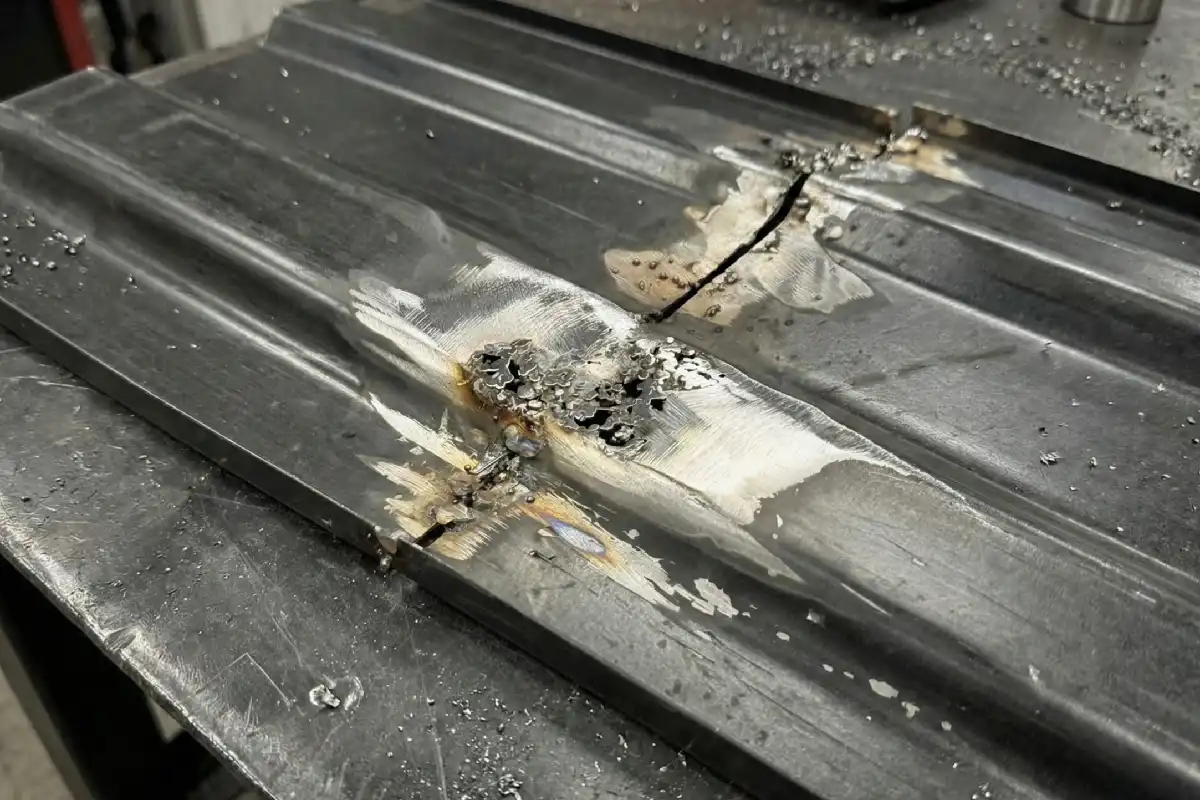
You may wonder if laser welding always burns through thin plates. It does not, but thin plates often face this risk when you use the wrong settings. Many people believe some common myths about welding thin materials:
- Higher power always works better, but too much power can melt through the metal.
- Low power cannot handle industrial jobs, but machines with 1000 to 1500W weld 1 to 3 mm plates well when you set them right.
- Power alone decides weld quality, but factors like beam focus and gas protection matter a lot.
- Water cooling is always needed, but air cooling works in many cases.
With the right adjustments, you can achieve clean, strong welds on thin plates.
Key Takeaways
- Thin plates can burn through during laser welding because they cannot lose heat fast. You should control the heat settings to stop damage.
- Set the pulse frequency higher for thin plates. This spreads the heat better and lowers the chance of melting the metal.
- Keep the duty cycle between 70% and 80% when welding thin plates. This gives enough heat for strong welds but does not burn through the plate.
- Check your welds before, during, and after welding. Finding problems early can stop burn-through and make sure welds are strong and clean.
- Try tips like moving slower and changing the laser beam focus. These help control heat and make the weld better.
Why Thin Plates Burn Through
Heat Concentration
When you do laser welding on thin plates, the heat goes to a small spot. This strong heat can make the metal much hotter than its melting point. The weld pool can get as hot as 3000℃ to 6000℃. Most metals melt at much lower temperatures. Steel melts between 1200℃ and 1500℃. Aluminum melts between 600℃ and 700℃. The laser gives a lot of energy very fast. Thin metal cannot move the heat away quickly enough.
Tip: Thin metal gets hot much faster than thick metal. This means it can burn through if you do not watch the heat.
The way heat works also depends on the metal type. Here is how different alloys act:
| Alloy Type | Effect of Heat Concentration on Integrity |
|---|---|
| Steels | Can get harder or crack; untempered martensite makes it harder and can crack. |
| Stainless Steels | May lose its rust protection in the hot area. |
| Aluminum | Often gets softer, so the joint is weaker. |
| Titanium/Nickel | Can have tiny changes inside from fast heating. |
| Copper | Moves heat fast, which changes how it cools and acts. |
Plate Thickness and Energy Input
Thin plates burn through more easily because of how they are made:
- Thin metals get too hot fast, so they can burn through.
- Thin metal is very sensitive to heat, so a little more power can cause trouble.
- It is hard to balance heat when welding thin to thick metals. Thin plates need less energy, but thick plates need more.
If you use too much energy, thin plates cannot take or spread the heat. This makes the metal melt away and leaves holes or weak spots. Thick metals do not have this problem. They need more heat to melt and can spread the heat out.
If you know these reasons, you can see why thin plates burn through more during laser welding. You must control the heat to keep the material safe.
Laser Welding Burn-Through Factors
Pulse Frequency Impact
Pulse frequency plays a big role in why thin plates burn through during laser welding. Pulse frequency means how many times the laser fires each second. When you use a higher pulse frequency, the laser sends out more pulses in less time. This makes each pulse shorter and gives less energy per pulse. You can control the heat better and avoid putting too much energy in one spot. This helps you keep the metal from melting through.
- Higher pulse frequency gives you:
- Shorter pulses
- Faster welding speed
- Smoother welds
- Better control of heat
If you use a low pulse frequency, each pulse has more energy. This works for thick plates, but it can melt thin plates too fast. You risk burn-through because the metal cannot cool down between pulses.
Tip: For thin plates, set a higher pulse frequency. This spreads the heat out and keeps the weld smooth.
Here is a quick look at how pulse frequency affects your weld:
| Pulse Frequency | Effect on Thin Plate Welding |
|---|---|
| High | Less heat per pulse, smoother weld, less burn-through |
| Low | More heat per pulse, deeper melt, higher burn-through risk |
Duty Cycle Settings
Duty cycle is another key reason why burn-through happens in laser welding. Duty cycle means the percentage of time the laser stays on during each pulse cycle. If you set a high duty cycle, the laser stays on longer. This puts more heat into the metal. If you set it too high, you can burn through thin plates.
You want to keep the duty cycle in the right range. Most experts suggest a duty cycle between 70% and 80% for thin plates. This gives enough heat to make a strong weld but not so much that you melt through the metal.
- A 70-80% duty cycle:
- Gives steady heat
- Reduces burn-through risk
- Makes the weld pool easier to control
If you use a duty cycle that is too low, the weld may not join well. If you use a duty cycle that is too high, you risk holes and weak spots.
Note: Always check your duty cycle setting before you start welding thin plates.
Other Factors That Affect Burn-Through
You also need to think about welding speed, material type, and electrode thickness. These factors change how much heat goes into the metal and why burn-through happens.
| Factor | Effect on Burn-Through |
|---|---|
| Welding Speed | Faster speed lowers heat input and burn-through risk. Slower speed increases risk. |
| Material Type | Metals like copper and aluminum reflect more laser light. You need to adjust power to avoid burn-through. |
| Electrode Thickness | Thin electrodes need less power. Too much power increases burn-through risk. |
If you use too much laser power, you can melt the metal too fast. This causes holes, spatter, and even surface cracks. Thin plates need lower power and higher speed to stay safe.
Laser welding gives you great control, but you must set the right pulse frequency and duty cycle. These settings decide how much heat goes into the metal and why burn-through happens. When you understand these factors, you can make better welds and avoid common problems.
Preventing Burn-Through
Adjusting Pulse Frequency
You can prevent burn-through in thin plates by adjusting the pulse frequency. When you set a higher pulse frequency, you send more laser pulses in a short time. Each pulse carries less energy. This helps you control the heat and avoid melting through the metal. You spread the heat more evenly, so the plate does not get too hot in one spot.
Why does this work? Thin plates cannot handle too much heat at once. If you use a low pulse frequency, each pulse is strong and can burn through the plate. A high pulse frequency gives you many gentle pulses. This keeps the weld pool stable and protects the plate.
Step-by-step guidance:
- Start with a moderate pulse frequency setting on your machine.
- Increase the frequency until you see a smooth, even weld without holes.
- Watch the weld pool. If it gets too large or deep, raise the frequency more.
- Test on scrap metal before welding your final piece.
Tip: Many welders find that a pulse frequency above 100 Hz works well for plates under 2 mm thick.
Setting Duty Cycle
Duty cycle controls how long the laser stays on during each pulse. You want to keep the duty cycle between 70% and 80% for thin plates. This range gives you enough heat to make a strong weld but not so much that you risk burn-through.
Why does this setting matter? If the duty cycle is too high, the laser stays on too long. The plate gets too hot and melts through. If the duty cycle is too low, the weld may not form well. You need to find the right balance.
How to set the duty cycle:
- Check your machine’s duty cycle setting before you start.
- Set the duty cycle to 70%.
- Make a test weld and check for holes or weak spots.
- If the weld does not join well, increase the duty cycle slightly.
- If you see burn-through, lower the duty cycle.
Note: Always adjust the duty cycle in small steps. Small changes can make a big difference.
Practical Welding Tips
You can use several practical tips to prevent burn-through when working with thin plates. These tips help you control heat and improve weld quality.
- Use pulse mode with low peak power. This limits the heat input and protects the plate.
- Slow down your travel speed. This gives you more control and helps the weld form without overheating.
- Adjust the laser beam focus. A small spot size lets you put energy exactly where you need it.
- Choose the right shielding gas. Good gas coverage keeps the weld clean and strong.
Some advanced tools can also help you. Heat balance control software manages the heat during welding. This software can stop burn-through by adjusting the energy in real time. Super Active TAWERS with heat balance control lets you weld plates as thin as 1.0 mm. You get fine control and avoid melting down the plate.
Here is a table showing some successful techniques:
| Technique | Description |
|---|---|
| Heat Balance Control Software | Controls heat input to prevent burn-through in thin plates. |
| Super Active TAWERS + HBC | Welds plates 1.0 mm or less with fine heat control, stopping melting down. |
Tip: Always test your settings on scrap metal before starting your main project. This helps you find the best pulse frequency and duty cycle for your material.
If you see signs of burn-through, such as holes or a sagging weld pool, stop and adjust your settings. Try lowering the duty cycle or raising the pulse frequency. You can also reduce the laser power or increase your welding speed.
By following these steps, you can prevent burn-through and achieve strong, clean welds on thin plates. Careful control of your settings makes laser welding safe and effective for even the thinnest materials.
Troubleshooting
Signs of Burn-Through
You need to find burn-through early to keep thin plates safe. Looking at your welds is an easy and cheap way to catch problems before they get worse. You should check your materials and the weld area before, during, and after welding. Checking before welding helps you find bad joints or gaps that can cause burn-through. Watching while you weld lets you see if there are holes or if the metal sags. Checking after welding helps you spot cracks, tiny holes, or changes in the weld shape.
| Stage of Inspection | Purpose | Key Activities |
|---|---|---|
| Pre-Weld Inspection | Make sure joints are ready | Check if materials are clean and lined up |
| In-Process Inspection | Watch welding settings | Look at the weld bead and end for problems |
| Post-Weld Inspection | Find surface problems | Look for cracks, holes, and shape changes |
You can look for these signs of burn-through: Holes or gaps in the weld bead, metal that sags or falls through the plate, color changes or rough edges near the weld, and weak or unfinished joints. If you see these signs, the heat was too high or the joint was not ready.
Quick Fixes
If you see burn-through, you can fix it fast and stop it from happening again. Lowering the laser power or making the welding go faster puts less heat into the plate. Moving the focus closer to the top spreads out the energy and keeps the thin metal safe. Using pulsed welding or special power waves helps you control the heat better.
You can also: Make the joint fit better and close any gaps before welding, use bars or other supports to hold the plate steady, change the laser beam shape to spread energy evenly, clean the surface so the laser works well, adjust the gas flow to keep the weld pool steady, try preheating if the plate is very thin, and use real-time checks to change power as you weld.
Tip: Always check your welds at every step. Fixing problems early saves time and keeps your welds strong.
When you know why burn-through happens and how to spot and fix it, you can make sure your thin plate welds stay clean and strong.
Thin plates burn through during laser welding because they cannot handle too much heat at once. You can prevent this by adjusting pulse frequency and duty cycle. These settings help you control the heat and keep your welds strong.
| Cause/Prevention Strategy | Description |
|---|---|
| High Amperage | Too much current melts thin metal. |
| Slow Travel Speed | Moving too slowly increases heat input. |
| Incorrect Machine Settings | Wrong settings lead to burn-through. |
When you set your machine correctly, you get clean welds, less distortion, and better results. Careful control lets you weld thin plates with confidence. 👍
FAQ
Why does laser welding burn through thin plates more easily than thick plates?
You see burn-through more often in thin plates because they cannot spread heat quickly. The laser puts a lot of energy in one spot. Thick plates can handle more heat without melting through.
Why should you use a higher pulse frequency for thin plate welding?
A higher pulse frequency gives you shorter, gentler pulses. You control the heat better. This helps you avoid burning holes in thin metal. You get smoother welds and less risk of damage.
Why does the duty cycle setting matter when welding thin plates?
The duty cycle controls how long the laser stays on. If you set it too high, you put too much heat into the plate. You risk melting through. The right setting keeps your weld strong and safe.
Why do you need to adjust welding speed for thin plates?
You need to move faster when welding thin plates. Fast movement lowers the heat in one spot. This helps you avoid burn-through and keeps the weld neat.
Why is pre-weld inspection important for thin plate welding?
Pre-weld inspection helps you find gaps, dirt, or bad joints. These problems make burn-through more likely. You can fix them before you start. This keeps your welds clean and strong.
How to Diagnose Button Response Issues in Laser Welding Machines
The light emission characteristics of laser welding machines
Why choose a laser welder manufacturer direct from China
What are fiber laser frequency settings and why do they matter